
With DocBits, document processing goes to the next level – smarter, faster, and more efficient. Built for Infor and SAP.

Your accounts payable team shouldn’t spend hours manually comparing invoices against purchase orders line by line. DocBits includes a powerful PO matching module that automates this process end to end – matching invoices to open POs at line-item level, flagging discrepancies instantly, and feeding clean data directly into your ERP.
Whether you run Infor LN, Infor M3, Infor CloudSuite or SAP – DocBits integrates natively and handles matching without manual intervention. PO matching is one part of a broader platform that covers your entire document and AP workflow.
Manual purchase order matching is one of the biggest bottlenecks in accounts payable. AP teams compare invoice lines to POs one by one, across multiple documents and systems – a process that is time-consuming, error-prone, and impossible to scale.
Common pain points:
The result: your team is reactive instead of strategic, chasing documents rather than managing vendors.
DocBits captures incoming invoices – in any format, from PDF to EDI to ZUGFeRD – and automatically matches them against open purchase orders in your ERP. The matching runs at line-item level, not just header level, so discrepancies in quantities, unit prices, or item descriptions are detected before they cause problems.
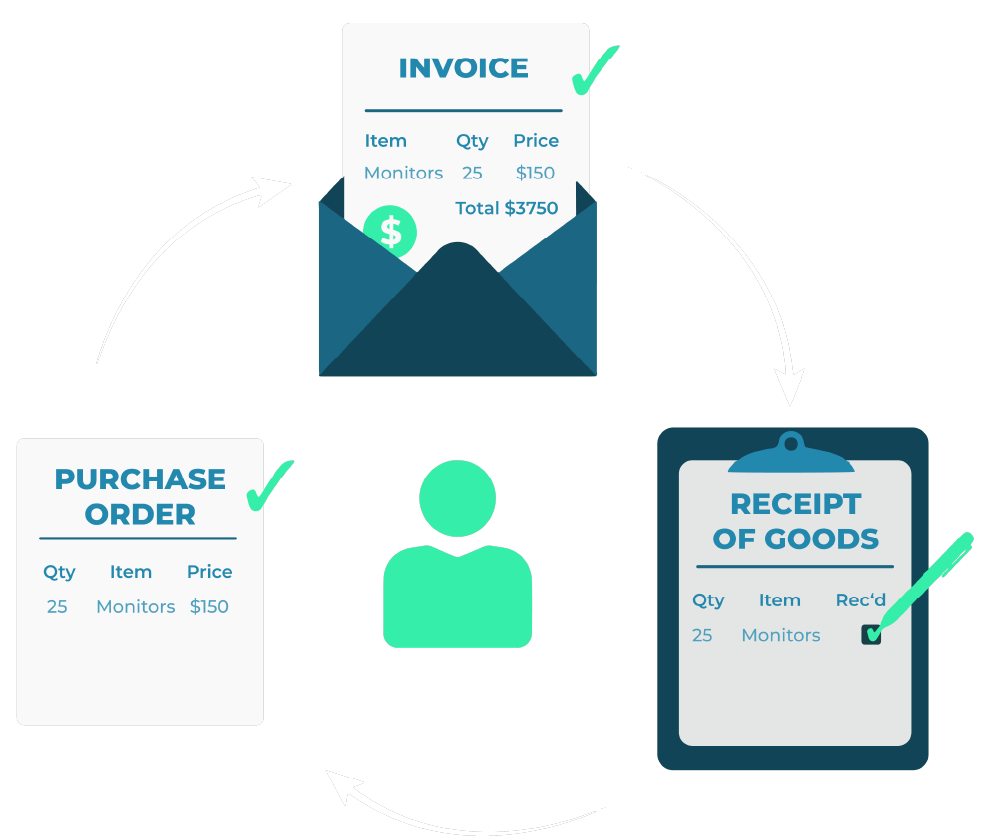
DocBits supports both 2-way matching (invoice vs. PO) and 3-way matching (invoice vs. PO vs. goods receipt). When all values align within defined tolerance thresholds, the invoice is approved automatically – no human touch required.
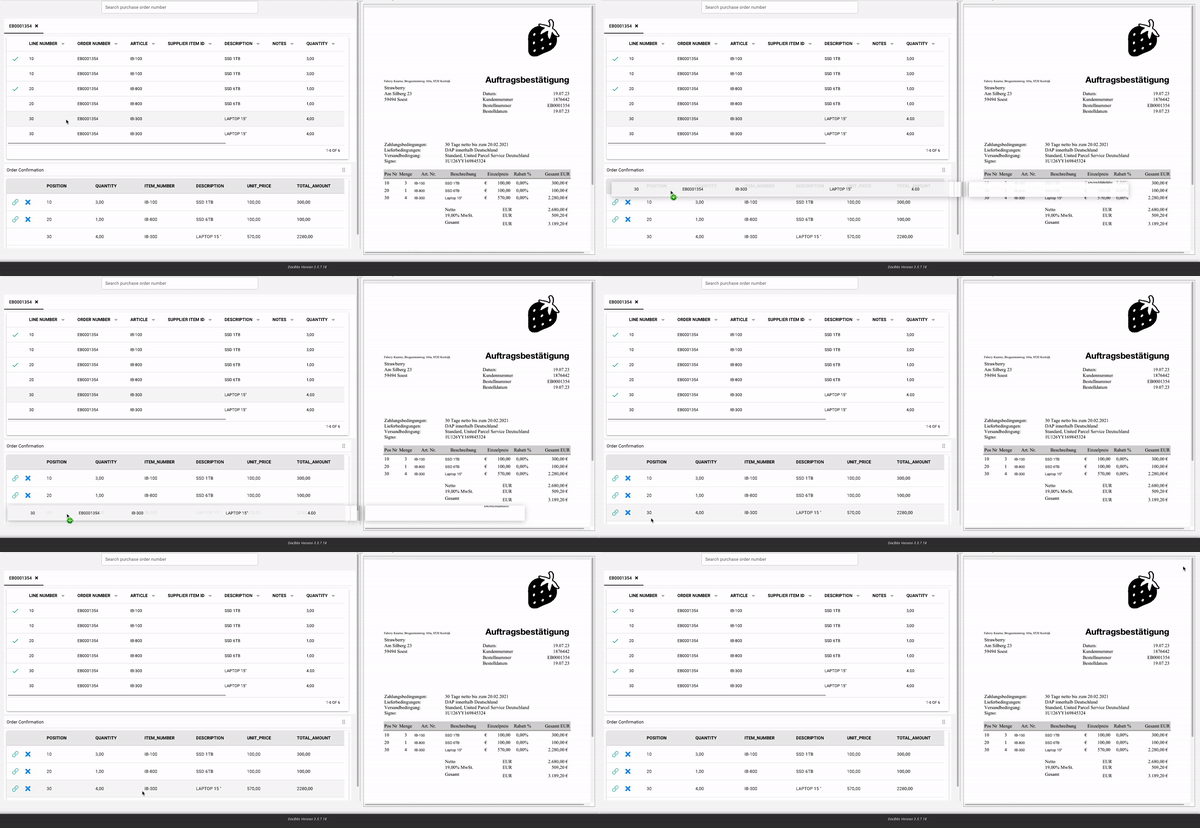
Header-level matching only compares totals. DocBits goes deeper: every line item on the invoice is validated against the corresponding PO line. This catches discrepancies that summary-level matching would miss entirely.
When a mismatch is detected – a price deviation, a quantity difference, a missing PO reference – DocBits flags the exception and routes it to the right approver automatically. Your team only sees what actually needs a decision.

You are currently viewing a placeholder content from YouTube. To access the actual content, click the button below. Please note that doing so will share data with third-party providers.
More InformationDefine acceptable thresholds for price and quantity differences at the PO or supplier level. Minor variances are approved automatically; anything beyond the threshold is escalated for review.
DocBits is purpose-built for companies running Infor or SAP as their ERP. The PO matching module connects natively – without middleware, without custom development.
Supported integrations:
PO and goods receipt data is pulled directly from your ERP in real time, so matching always runs against current, accurate data – not exports or snapshots.
| Manual Process | DocBits PO Matching | |
|---|---|---|
|
Matching speed |
Hours per invoice |
Seconds |
|
Match level |
Header only |
Line-item level |
|
Error detection |
Inconsistent |
Automated, every invoice |
|
Exception handlin |
Manual routing |
Rules-based, automatic |
|
ERP posting |
Manual data entry |
Direct, native integration |
|
Audit trail |
Fragmented |
Complete, searchable |
Teams using DocBits reduce invoice processing time significantly, eliminate duplicate payments, and free their AP staff from repetitive data work.
PO matching doesn’t happen in isolation. It’s a critical step within the broader procure-to-pay (P2P) cycle – connecting procurement, goods receipt, and accounts payable into one continuous, automated flow.
DocBits covers the entire document chain: from purchase order capture and order confirmation processing, through automatic matching and exception handling, to ERP posting and payment approval. This means fewer handoffs, fewer errors, and full visibility across your P2P process.
→ Learn more about Purchase Order Automation and Automated Invoice Processing
PO matching software automatically compares supplier invoices against purchase orders to verify that billed items, quantities, and prices match what was ordered – and in 3-way matching, also what was received. It replaces manual line-by-line comparison in accounts payable, reduces errors, and ensures that your company only pays for what was actually ordered and delivered.
Yes. PO matching software – or a PO matching module within a broader AP automation platform – automatically compares incoming invoices against open purchase orders at line-item level. Instead of manually checking quantities, prices, and item descriptions across multiple documents, the system does it in seconds and only flags exceptions that require human review.
For companies on ERP systems like Infor or SAP, solutions like DocBits connect natively and handle the entire matching process without manual data entry.
Yes, modern AP automation platforms use AI and rule-based logic to automate PO matching end to end. AI handles invoice capture and data extraction – reading invoices in any format, including PDFs, scanned documents, and e-invoices – while rule-based matching logic compares the extracted data against PO and goods receipt information in your ERP. The result: invoices that match are approved automatically, and only genuine discrepancies reach your team.
The most important criteria are matching depth (line-level vs. header-level), ERP integration (native vs. middleware), exception handling (how discrepancies are flagged and routed), tolerance configuration, and support for both 2-way and 3-way matching. For companies on Infor or SAP, native ERP connectivity is especially critical to avoid data sync issues and manual workarounds.
2-way matching compares the invoice to the purchase order only – verifying item, quantity, and price. 3-way matching adds the goods receipt as a third document, confirming that what was billed was actually delivered. 3-way matching provides stronger financial controls and is recommended for companies handling physical goods or high-value purchases.
Line-level PO matching validates each individual line item on an invoice against the corresponding PO line – including item description, quantity, and unit price. Header-level matching only compares document totals, which means discrepancies within individual line items can go undetected. Line-level matching is essential for accuracy, especially with complex or multi-line purchase orders.
DocBits connects natively to Infor LN, Infor M3, Infor CloudSuite, and SAP. When an invoice is received, DocBits pulls the corresponding PO and goods receipt data directly from your ERP in real time, runs 2-way or 3-way matching at line-item level, and posts the result back into your ERP automatically. Discrepancies are flagged and routed to the right approver based on configurable rules – no manual data entry, no middleware required.
When a mismatch is detected – such as a price deviation, a quantity difference, or a missing PO reference – DocBits flags the exception and routes it to the responsible approver based on predefined rules. Tolerance thresholds can be configured at the PO or supplier level, so minor variances are approved automatically and your team only reviews what genuinely
DocBits automates your entire PO matching process – from invoice capture to ERP posting – natively integrated with Infor and SAP. See how it works in a personalized demo.

You are currently viewing a placeholder content from Vimeo. To access the actual content, click the button below. Please note that doing so will share data with third-party providers.
More InformationYou are currently viewing a placeholder content from YouTube. To access the actual content, click the button below. Please note that doing so will share data with third-party providers.
More InformationYou need to load content from reCAPTCHA to submit the form. Please note that doing so will share data with third-party providers.
More InformationYou are currently viewing a placeholder content from Vimeo. To access the actual content, click the button below. Please note that doing so will share data with third-party providers.
More InformationYou are currently viewing a placeholder content from YouTube. To access the actual content, click the button below. Please note that doing so will share data with third-party providers.
More InformationYou are currently viewing a placeholder content from Bunny Stream. To access the actual content, click the button below. Please note that doing so will share data with third-party providers.
More InformationYou are currently viewing a placeholder content from Wistia. To access the actual content, click the button below. Please note that doing so will share data with third-party providers.
More InformationYou are currently viewing a placeholder content from Facebook. To access the actual content, click the button below. Please note that doing so will share data with third-party providers.
More InformationYou are currently viewing a placeholder content from Instagram. To access the actual content, click the button below. Please note that doing so will share data with third-party providers.
More InformationYou are currently viewing a placeholder content from X. To access the actual content, click the button below. Please note that doing so will share data with third-party providers.
More Information