

Document Workflow Automation That Actually Works

Stop chasing documents across departments. Start processing from capture to posting—automatically.

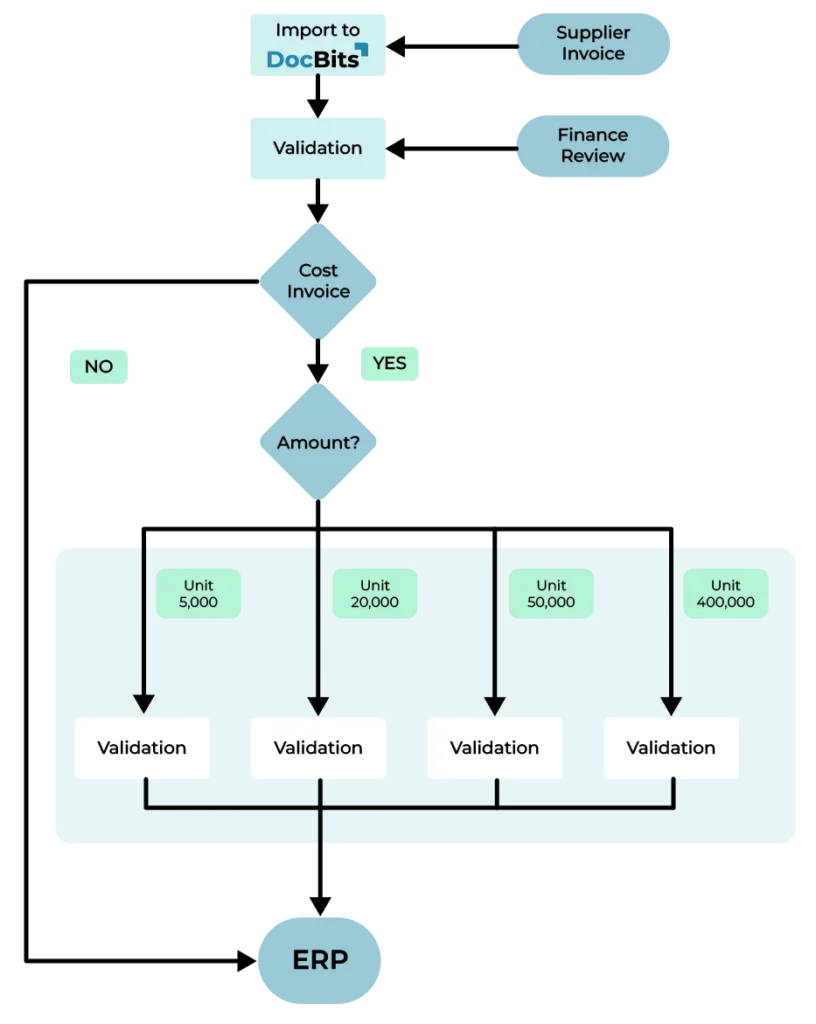
Documents don’t approve themselves. But with document workflow automation, they move through your organization as if they did. See how automated document workflows eliminate manual routing, reduce approval times by 70%, and integrate directly with your ERP. 

Why Manual Document Routing Slows Down Your Business

A document, for example an invoice, arrives Monday morning. By Friday afternoon, it’s still sitting in someone’s inbox.

Not because anyone forgot. Not because the process is unclear. But because every document needs two or more people to touch it before it reaches your ERP.

A lot of manual steps. A lot of opportunities for delay. 

The same pattern repeats for purchase orders, expense reports, delivery notes, contracts—every document that moves through Finance, Procurement, Warehouse, or Sales.

The worst part? Everyone is working hard. Nobody is blocking anything on purpose. The process itself is the problem.

Manual document workflows mean no visibility, no consistency, no scalability. You’ve digitized the documents, but you’re still moving them manually. That’s not automation—that’s digital paper pushing.

The real cost isn’t the time spent routing documents. It’s the business decisions delayed while documents sit in queues.

Benefits of Document Workflow Automation

The workflows eliminate manual handoffs. Documents route themselves based on rules you define: amount thresholds, GL codes, vendors, departments, or any combination of criteria.

Cut Approval Time by 70%

Automated document workflows reduce approval cycles from days to hours. What took 3-5 days now happens in under 24 hours. Your team stops forwarding emails and starts focusing on work that matters.

Reduce Errors Before They Cost Money

Document workflow automation eliminates duplicate payments, missed approvals, and routing mistakes. The system enforces your rules consistently—every time, for every document.

Real-Time Visibility Across All Document Workflows

Track every document from capture to posting through your automated document workflow dashboard. Know exactly where approvals are stuck, who’s holding up the queue, and which documents need attention.

Scale Without Hiring More People

Document workflow automation handles routine tasks automatically. Process 2x the documents without 2x the team. Your team handles exceptions—which become rare when automated document workflows catch them early.

How DocBits Document Workflow Automation Works

Configure automated document workflows using simple When-And-Then logic—no coding required:

WHEN a document arrives
AND certain conditions are met (amount, vendor, GL code, department)
THEN actions happen automatically (route, notify, approve, post to ERP)

This rule-based approach powers document workflow automation for any document type, any department, any process.

When – What Triggers the Workflow?

The trigger is the event that starts the workflow. Typical triggers include:

  • A document is uploaded to the system
  • A document is recognized as a specific type (e.g., invoice, purchase order)
  • A document reaches a certain processing status

Example: When a document is recognized as an invoice, the workflow starts automatically.

And – Under What Conditions Should the Workflow Run?

In many cases, a trigger alone is not enough. Additional conditions ensure the workflow only runs when all criteria are met:

  • Document status
  • Supplier or vendor information
  • Invoice amount or threshold
  • Department or cost center

Example: When a document is an invoice and the status is “Ready for Validation.”

Only when both conditions are met will the next step be triggered.

Then – What Action Should Be Performed?

The final step defines what the system does next. Typical actions include:

  • Assigning the document to a specific department
  • Starting an approval workflow
  • Sending automated notifications
  • Forwarding data to an ERP system (e.g., Infor LN or Infor M3)
  • Updating the document status

A complete workflow might look like this:

When: Document type = Invoice And: Status = Ready for Validation Then: Assign to the Finance team + send automated notification

What previously required several manual steps now happens automatically in the background.

Standard or Advanced Document Workflow Automation – You Have The Choice

Most organizations start with our Standard Workflows for common processes like invoice approval, PO matching, and expense routing.

Need something more complex? Advanced Workflows handle multi-system processes, custom validation rules, and conditional logic across multiple document types. And if you have unique business needs, the SDK (requires DocBits Ai Workforce) lets you build completely custom workflow types that fit your exact requirements. All configured without coding.

Why Teams Choose DocBits for Document Workflow Automation

Icon accuracy – data extraction

DATA ACCURACY YOU CAN TRUST

Documents flow through workflows with confidence when data is right the first time. DocBits delivers industry-leading extraction accuracy above 95%—meaning your automated workflows route, validate, and process based on reliable information, not guesswork.
Icon no coding required

BUILD WORKFLOWS WITHOUT DEVELOPERS

Visual workflow builder with drag-and-drop configuration. Pre-built templates for common document workflow automation use cases. Test automated document workflows before going live. Modify rules on the fly—no downtime, no developer tickets.
Icon pricing – document-based billing

PAY FOR DOCUMENTS, NOT HEADCOUNT

Your costs match your actual volume—not how many people touch the documents. Whether five employees or fifty use DocBits, you pay per document processed. Scale your team without scaling your software budget.
Icon support and training

SUPPORT THAT GETS YOU RUNNING FAST

Fast response times. Complete video training library. Self-service resources that answer questions before you ask them. New to workflow automation? Book a free demo and see DocBits in action—no lengthy onboarding required.

Native ERP Integration for End-to-End Document Workflow Automation

DocBits document workflow automation connects natively to Infor LN, Infor M3, Infor CloudSuite, and SAP.

Approved documents post automatically to the correct GL accounts through automated document workflows. PO data flows in real time. Status updates sync between DocBits and your ERP.

No CSV exports. No manual data entry. No middleware to maintain.

Supported ERP systems for document workflow automation:

  • Infor LN (Cloud & On-Premise)
  • Infor M3 (Cloud & On-Premise)
  • Infor CloudSuite Distribution & Industrial
  • SAP S/4HANA
DocBits ERP integration – puzzle pieces symbolizing seamless connection with Infor and SAP

Frequently Asked Questions About Document Workflow Automation

Is there software that automates document workflows for ERP systems like Infor and SAP S/4HANA?

Yes. Document workflow automation software eliminates manual routing by automatically moving documents through approval processes based on predefined rules. Systems like DocBits handle invoices, purchase orders, expenses, contracts, and other document types—routing them to the right person at the right time without human intervention. DocBits automates document workflows from capture to ERP posting with native integration for Infor LN, Infor M3, Infor CloudSuite, and SAP S/4HANA.

Can software automatically route invoices to the correct approver based on GL codes or amount?

Yes. Workflow automation software routes invoices based on configurable rules like amount thresholds, GL codes, vendors, or cost centers. For example, invoices under a certain amount can auto-approve, while higher amounts route to senior management for review. If you have an ERP system like Infor or SAP S/4HANA, DocBits provides a visual workflow builder that lets you configure these routing rules in minutes—no coding required, and approvals happen automatically within your existing approval structure.

Can AI automate document workflows?

Yes. AI enhances document workflow automation by extracting data from documents automatically and making intelligent routing decisions. AI-powered systems like DocBits use machine learning to capture invoice data, validate against purchase orders, and route documents based on learned patterns. This eliminates manual data entry and improves accuracy over time. DocBits combines AI-driven document processing with rule-based workflow automation—extracting data intelligently, then routing documents automatically through your approval process to your ERP system.

Ready to eliminate manual document workflows?

See how automated document workflows route, approve, and post documents from capture to ERP—with no manual intervention required.