
Downloading files. Copying fields. Fixing validation errors. Chasing approvals. With DocBits, you stop doing all of that!

More and more of your suppliers and public-sector partners are sending invoices via the PEPPOL network. That’s a good thing — but only if your receiving end can handle them without manual effort. If your team is still downloading XML files, copy-pasting data, or manually validating PEPPOL invoices against ERP entries, you’re carrying costs that the format was designed to eliminate.
DocBits receives, reads, and processes PEPPOL invoices automatically — so your AP team focuses on exceptions, not data entry.
PEPPOL (Pan-European Public Procurement OnLine) is a European framework for exchanging structured business documents — invoices, purchase orders, credit notes — across borders and systems. Unlike a PDF or scanned invoice, a PEPPOL e-invoice arrives as machine-readable XML, formatted according to the PEPPOL BIS Billing 3.0 standard, which is based on the EU norm EN 16931.
That structural precision is the point. A PEPPOL invoice doesn’t need OCR. It doesn’t need to be “read” the way a scanned document does. The data is already there — in defined fields, with defined values. The question is whether your systems can receive that data and do something with it automatically.
If your current workflow still involves a human in the middle, you’re not getting the value PEPPOL was built to deliver.

Even teams who have “dealt with” PEPPOL for years often carry hidden costs they’ve stopped noticing:
Validation errors that surface too late
PEPPOL BIS Billing 3.0 has strict schematron rules. An invoice that doesn’t validate can’t be accepted — but without automated checks, you often discover the issue downstream, when it’s already caused a delay.
ERP mapping that never quite works itself
The XML fields in a PEPPOL invoice don’t automatically align with your ERP’s structure. Supplier master data, GL accounts, cost centers — someone has to check and assign these. Every time.
ERP mapping that never quite works itself
The XML fields in a PEPPOL invoice don’t automatically align with your ERP’s structure. Supplier master data, GL accounts, cost centers — someone has to check and assign these. Every time.
Approval bottlenecks that slow payment cycles
Even a perfectly valid PEPPOL e-invoice can sit waiting for an approver. Without automated routing, it sits in inboxes, not queues.
Audit gaps that create compliance risk.
For e-invoicing compliance, you need a complete, timestamped record of every processing step. Email chains and manual logs don’t meet that standard.
These aren’t edge cases. They’re the daily reality for any AP or IT team handling PEPPOL e-invoices without the right automation layer.
DocBits handles the entire PEPPOL invoice processing workflow — from ingestion to ERP posting — without manual intervention at any stage.
DocBits picks up incoming PEPPOL e-invoices via email, SFTP, or API the moment they arrive. Your team doesn’t download files. They don’t convert formats. Processing starts automatically.
Every PEPPOL invoice is validated against PEPPOL BIS Billing 3.0 schematron rules on arrival. If an invoice fails, your team gets an immediate alert with a plain-language description of the issue — not a raw XML error message. Valid invoices move forward without interruption.

DocBits maps every structured field in the PEPPOL XML — supplier data, line items, tax codes, payment terms — directly to your ERP’s data model (Infor LN, Infor M3, Infor CSD or SAP S/4HANA). Nothing is retyped. Nothing is missed. Posting errors caused by manual entry disappear.
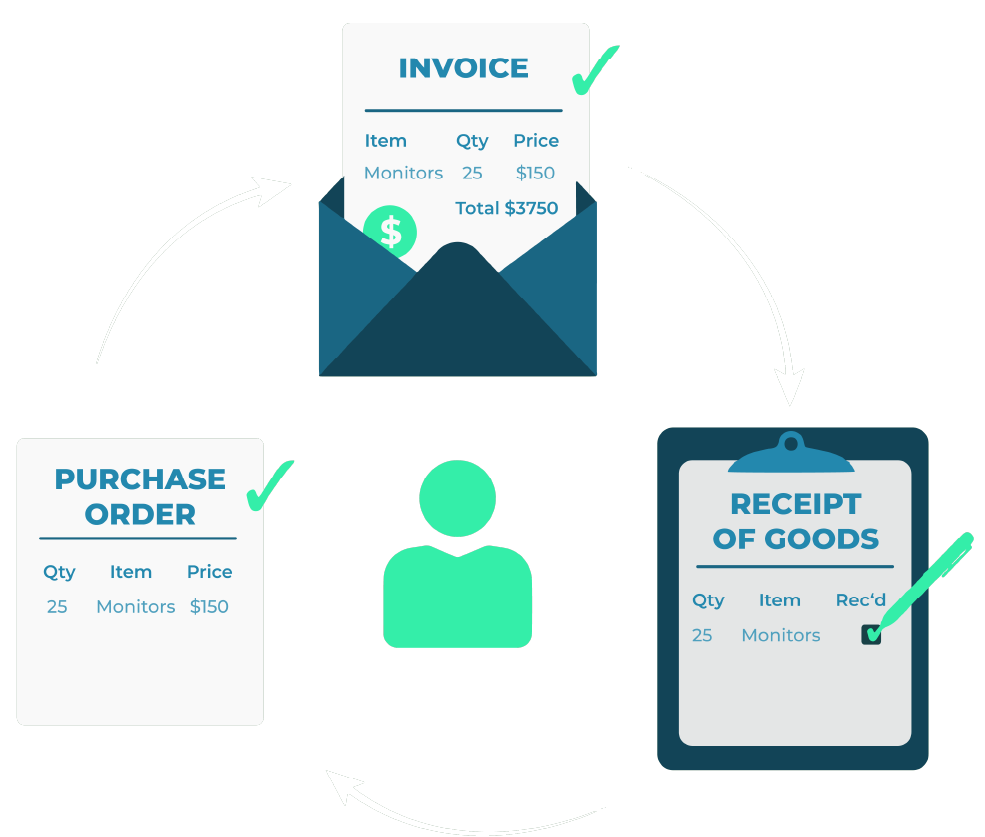
If a purchase order exists for the incoming PEPPOL e-invoice, DocBits finds it and matches it automatically — line by line, within the tolerance rules you define. Matched invoices move to posting on their own. Discrepancies are flagged for human review. Your team stops processing and starts deciding.
Invoices that require a human decision are automatically routed to the right approver, based on the rules you set: amount thresholds, supplier categories, cost centers. Approvers get clear, contextual notifications. Invoices stop getting lost.
Every step of your PEPPOL invoice processing — receipt timestamp, validation result, matching status, approval decision, ERP posting — is logged automatically. You have complete, traceable documentation for every invoice, without maintaining it manually.


If your ERP is Infor LN, Infor M3, or Infor CloudSuite Distribution, DocBits connects natively. PEPPOL e-invoices flow from DocBits directly into your ERP — no middleware, no manual exports, no IT involvement on every processing run.
Running SAP S/4HANA? DocBits integrates natively here too. SAP’s Document and Reporting Compliance (DRC) handles the technical delivery of PEPPOL invoices — but the processing workflow that follows still requires an automation layer for field mapping, PO matching, approval routing, and GL posting. DocBits picks up exactly at that point, turning a received PEPPOL invoice into a fully posted transaction without manual steps in between.
Your AP team works in one interface. Your ERP receives clean, validated, fully mapped data. The gap between your inbox and your books closes — regardless of which system sits at the end.
PEPPOL is one of several structured e-invoice formats DocBits supports. If your suppliers also send XRechnung, ZUGFeRD, Fattura PA, or Swiss QR invoices, DocBits processes all of them through the same workflow — with no separate tools, no format-specific workarounds, and no additional configuration per format.
Your team works in one interface. Your ERP receives clean, validated data. Regardless of which format the invoice arrived in.
The right software depends on your ERP environment and invoice volume. For mid-to-large enterprises running Infor LN, Infor M3, or Infor CloudSuite, DocBits is purpose-built for exactly this — receiving PEPPOL e-invoices, validating them against PEPPOL BIS Billing 3.0, and posting them directly into your ERP without middleware. Unlike generic e-invoicing tools, DocBits covers the full processing workflow: validation, PO matching, GL coding, approval routing, and ERP posting in one platform.
Infor LN, M3, and CloudSuite don’t handle PEPPOL invoice validation and processing natively out of the box. You need a layer between your inbound channel and the ERP that validates the PEPPOL XML, maps the fields to your ERP structure, and triggers the posting. DocBits fills exactly that role — with a native Infor integration that requires no custom middleware.
SAP S/4HANA and SAP ERP can receive PEPPOL invoices via SAP Document and Reporting Compliance (DRC), which acts as a certified PEPPOL Access Point and handles the technical delivery and basic validation. However, the invoice still lands in the eDocument Cockpit — and from there, further processing typically requires an additional automation layer for field mapping, PO matching, approval routing, and GL posting. DocBits connects to SAP via API and takes over exactly at that point, turning a technically received PEPPOL invoice into a fully processed, posted transaction — without manual intervention.
See how DocBits handles PEPPOL — and every other e-invoice format your suppliers send — in a live demo tailored to your ERP environment.
You are currently viewing a placeholder content from Vimeo. To access the actual content, click the button below. Please note that doing so will share data with third-party providers.
More InformationYou are currently viewing a placeholder content from YouTube. To access the actual content, click the button below. Please note that doing so will share data with third-party providers.
More InformationYou need to load content from reCAPTCHA to submit the form. Please note that doing so will share data with third-party providers.
More InformationYou are currently viewing a placeholder content from Vimeo. To access the actual content, click the button below. Please note that doing so will share data with third-party providers.
More InformationYou are currently viewing a placeholder content from YouTube. To access the actual content, click the button below. Please note that doing so will share data with third-party providers.
More InformationYou are currently viewing a placeholder content from Bunny Stream. To access the actual content, click the button below. Please note that doing so will share data with third-party providers.
More InformationYou are currently viewing a placeholder content from Wistia. To access the actual content, click the button below. Please note that doing so will share data with third-party providers.
More InformationYou are currently viewing a placeholder content from Facebook. To access the actual content, click the button below. Please note that doing so will share data with third-party providers.
More InformationYou are currently viewing a placeholder content from Instagram. To access the actual content, click the button below. Please note that doing so will share data with third-party providers.
More InformationYou are currently viewing a placeholder content from X. To access the actual content, click the button below. Please note that doing so will share data with third-party providers.
More Information