
Efficient task management in DocBits:

How to optimize your document management

With DocBits‘ task and notification feature, you can keep track of all your document management tasks. Increase the efficiency of your workflows and avoid unfinished tasks.

Why tasks and notifications are indispensable in document processing

In modern companies, document management is more than just storing and archiving documents. Tracking tasks, assignments, and updates is crucial for designing efficient workflows and avoiding delays.

With DocBits’ task and notification feature, you can keep track of all tasks—whether they are created manually or generated automatically by workflows. This ensures that no important steps are overlooked and your team can work smoothly.

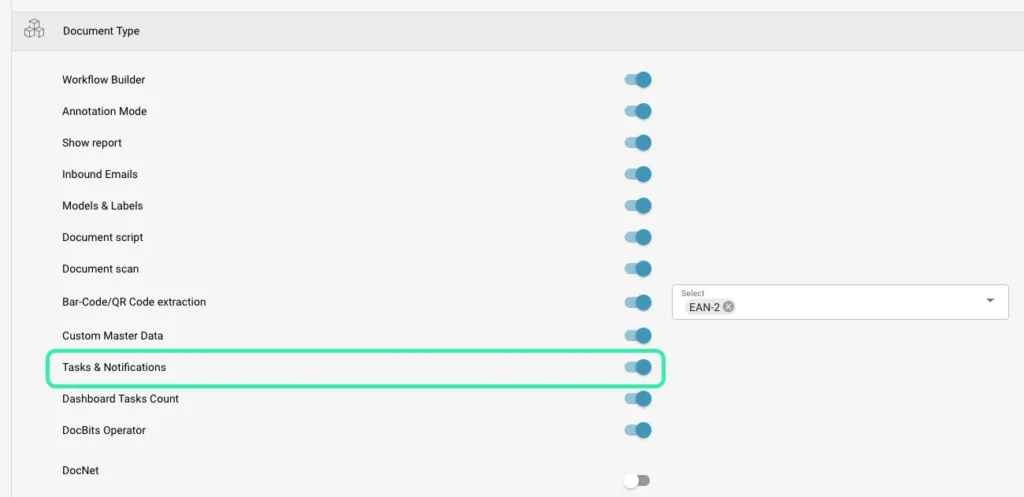
Enable tasks & notifications

After activation under Settings → Document processing → Modules, you will find the function in the main menu on the left-hand side.

Advantages at a glance:

  • Task icon in the side menu for quick access
  • Dashboard task counter for open tasks at a glance
  • Creation of tasks manually or automatically via workflow

How to create tasks in DocBits

Tasks can be created in two ways:

  1. Manually: Directly from the document by the user.
  2. Automatically: Workflow-based tasks, e.g., depending on document conditions or process steps.

Each task contains all important information:

  • Name: Short, meaningful label
  • Priority: Low, Medium, High
  • Status: Open, In Progress, Closed
  • Assigned to: Users or user groups
  • Description: Further details or instructions

Efficient task management with the dashboard

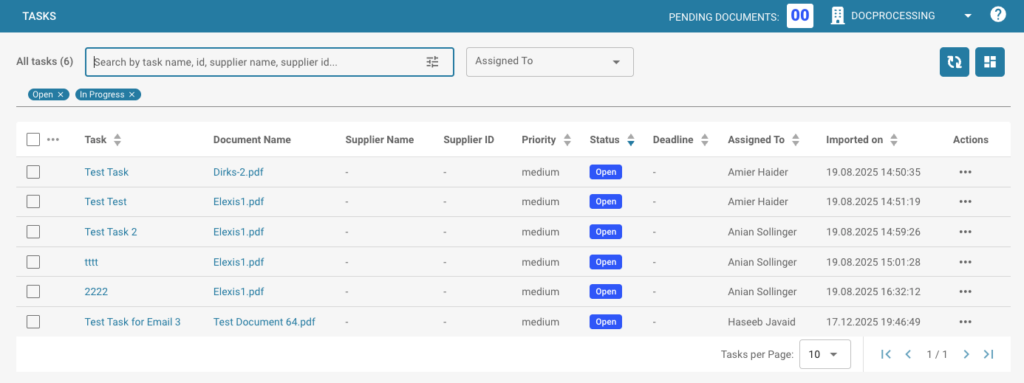
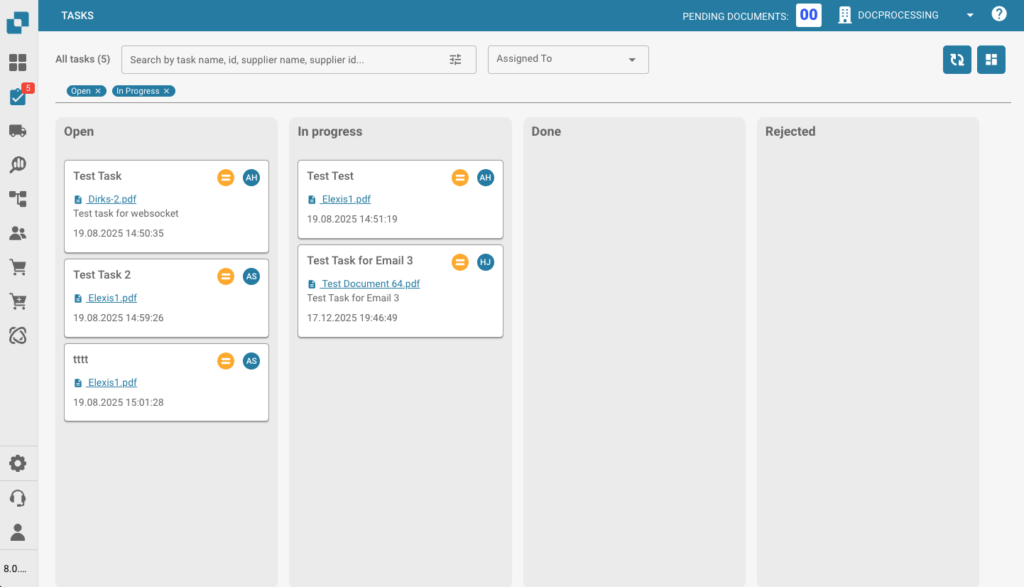
The Task Dashboard offers two flexible views:

Table view:

  • Optimized for sorting, filtering, and bulk actions
  • Displays all key information such as status, priority, due date, and assigned users

Map view (board style)

  • Visual layout for quick overview of workload
  • Groups tasks by status
  • Drag-and-drop function for easy status changes

Interactive features for users

DocBits allows users to easily manage tasks:

  • Change task status
  • Reassign tasks
  • Add descriptions
  • Close completed tasks

Automatically generated workflow tasks appear directly in the dashboard and follow the standard rules for task management.

Benefits for your company

  • Increased efficiency: No follow-ups are lost
  • Workflow automation: Tasks are automatically created and tracked
  • Transparency: All tasks are centrally visible and easily accessible
  • Flexibility: Two dashboard views for individual working styles

🎬 Video: See how the task & notification feature in DocBits revolutionizes your document processes.

Conclusion

DocBits‘ task and notification feature makes your document management more efficient, transparent, and secure. Use the task dashboard to centrally manage tasks, optimize workflows, and increase your team’s productivity.

Curious? Simply ask us
task management

Image credits: Header- & featured image by FELLOWPRO

Share: