
INTELLIGENT SEARCH · INFOR & SAP

Intelligent Document Search: Find Any Invoice the Way You Remember It

Search every field DocBits extracts, find documents with similar content, or simply ask in plain language. All from the search bar in your DocBits dashboard.
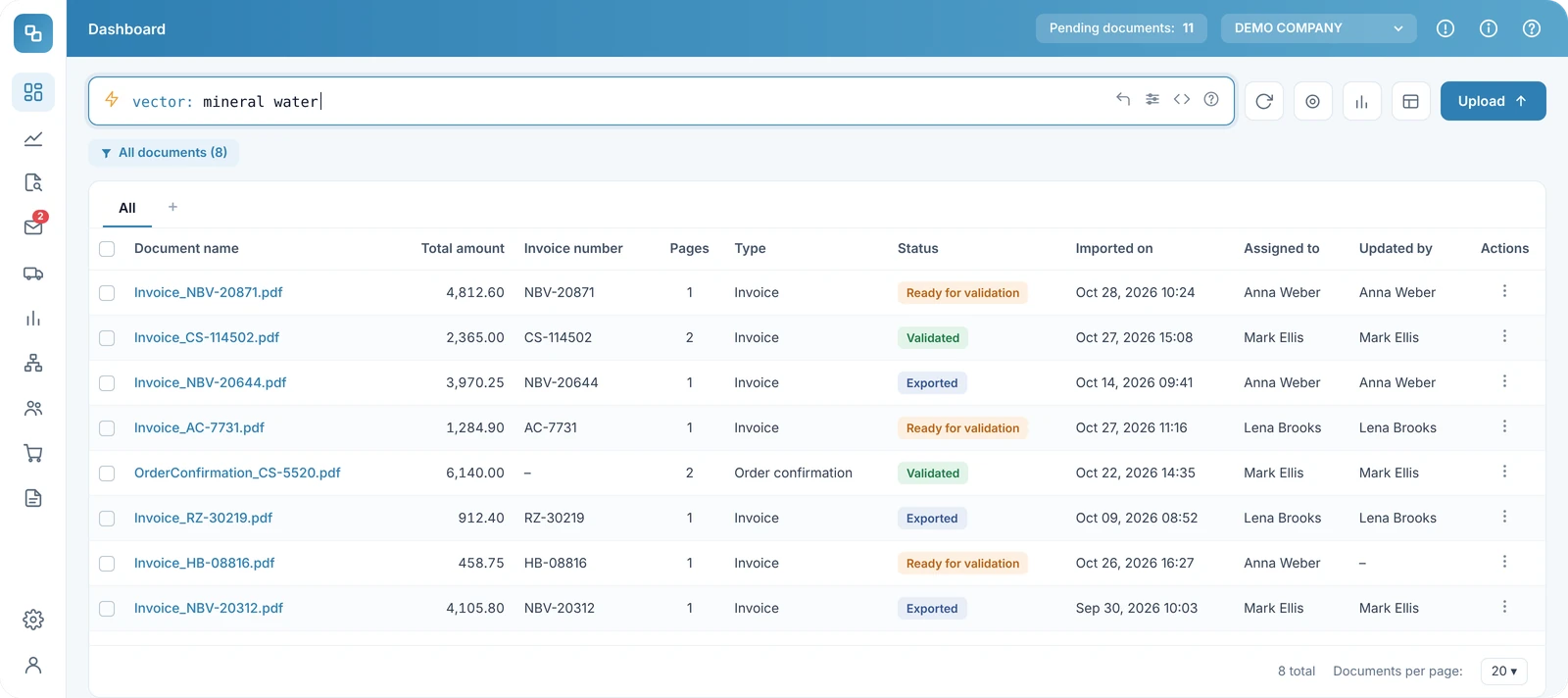
DocBits dashboard with Intelligent Search: a vector search for mineral water returns matching invoices and order confirmations

400+ companies

ISO 27001 certified

Native for Infor LN, M3, CSD and SAP S/4HANA

You know the document exists. Finding it is the hard part... or not?

Most questions in accounts payable don't come with an invoice number:

An auditor asks

for every invoice from one supplier above €10,000 last quarter.

A supplier calls

about a payment, and all you have is the company name and a rough amount.

Month-end is close

and you need to see what's overdue, what's still waiting for validation and who it's assigned to.

Without a way to search the content of your documents, you end up clicking through lists, exporting to Excel or asking colleagues.

Standard search DocBits Intelligent Search
Filename, document ID, invoice number, purchase order number Every extracted field: supplier, amounts, dates, status, line items and your custom fields

Three ways to find what you need

1 · Fulltext search

2. Vector search

3. AI search

1. Fulltext search: when you know the details

Filter by any extracted field, set amount and date ranges, and combine conditions with AND, OR and NOT. Relative dates such as this month or last week save you from typing date ranges.

Smart filters give you one-word shortcuts:

overdue

documents past their due date

@Name

documents assigned to a colleague

#INV-1234

quick lookup by document number

$5k+

amounts above 5,000 in the document's currency

You’ll find the full query syntax in the DocBits documentation.

Example queries

supplier_name: Acme AND total_amount > 1000

invoice_due_date between 2026-01-01, 2026-04-30

(status: ready_for_validation OR status: validated) AND invoice_date: this_month

2. Vector search: when you remember what it was about

Vector search finds documents that are similar in meaning to your query, not only those that match it word for word. Results are ranked by similarity.

Example queries

vector: frozen food invoices

3. AI search: when you'd rather type a sentence

Type your question in plain language. DocBits uses AI to turn it into structured filters and runs them through the search index. Just start your query with ai:

Example queries

ai: invoices from ACME over 1000 last quarter

Vector search and AI search work differently: vector search finds similar content, AI search translates your question into filters. Both are part of the Intelligent Search module.

Which search for which task

Task Best way Example
Pull all invoices from one supplier above an amount for an audit Fulltext search supplier_name: Acme AND total_amount > 10000
See what's overdue before month-end Fulltext search (smart filter) overdue
Check what's assigned to a colleague Fulltext search (smart filter) @Anna
Answer a supplier call with only a name and rough amount AI search ai: invoices from Acme over 5000 last quarter
Find invoices with similar content Vector search vector: freight and transport charges
Open a document when you have its number Fulltext search (smart filter) #INV-1234

Built on the data DocBits already extracts

DocBits Intelligent Search makes every field DocBits extracts searchable, across the invoices and business documents you process for Infor LN, Infor M3, Infor CSD and SAP S/4HANA.

Every field your document types capture

Field filters cover supplier, invoice data, line items and custom fields. Range comparisons work on numeric and date fields.

Every document type you process

Search works for invoices, order confirmations and the other document types you process with DocBits.

Access controlled

When the module is activated, existing documents are indexed. How long this takes depends on your document volume. Fulltext queries are available once the initial indexing has finished.

Secure by design. Simple to switch on.

ISO 27001 certified

and GDPR-compliant

Activated by your organisation admin

under Settings → Document Processing → Module

Your existing documents included

Users need the module and the appropriate permissions to search.

See it with your own documents

In a demo with our CRO, you'll see how your team can find invoices and other documents, using examples that match how you actually work.

Already using DocBits? Talk to your DocBits contact or read the setup guide.

Frequently Asked Questions ​

Several AP automation and IDP platforms now include AI-assisted search. They differ mainly in what they search (raw text or extracted fields) and which search modes they offer. DocBits, for example, offers intelligent document search with three modes: field-based full-text search, semantic (vector) search and natural-language AI search. All three work across the fields extracted from processed documents, with native integration for Infor LN, M3, CSD and SAP S/4HANA.

Is there IDP software with semantic search that works with Infor or SAP?

Yes. DocBits combines template-free document processing with semantic search for companies running Infor LN, Infor M3, Infor CSD or SAP S/4HANA. Vector search finds documents with similar content, and field filters narrow results by supplier, amount or date.

Can you search invoices in plain language with AI?

Yes. Natural-language search turns a question such as “invoices from supplier X over 1,000 last quarter” into structured filters and returns the matching documents. In DocBits, you start the query with ai:. For a known document number, the # shortcut looks it up directly.

Full-text search matches exact words and values, which makes it reliable for invoice numbers, supplier names and amounts. Semantic search compares meaning using vector representations, so it also finds documents that use different wording, but it is less precise for exact IDs. That’s why many teams combine both approaches, often called hybrid search. In DocBits, vector search finds similar content, AI search turns plain language into filters, and full-text search handles exact field queries.

Find documents the way your team thinks