
The Best Purchase Order Automation Software in 2026: A Complete Guide

Every procurement team knows the feeling: a purchase order sitting in someone’s inbox, waiting for approval. Meanwhile, a supplier is waiting, a project is stalled, and somewhere in Accounts Payable, someone is manually re-entering data that already exists in three other systems. In 2026, this is no longer a resource problem — it is a tooling problem.

Purchase order automation has matured significantly. The question is no longer whether to automate your PO process, but which solution fits your ERP landscape, your document complexity, and your team’s actual workflows. This guide breaks it down.

What Is Purchase Order Automation Software — and Why Does It Matter?

Purchase order automation software digitizes and automates the full PO lifecycle: from purchase requisition and multi-level approval routing, to PO generation, goods receipt matching, and invoice reconciliation. The goal is to eliminate manual data entry, reduce approval bottlenecks, and create a fully traceable, audit-ready procurement process.

The numbers make a compelling case. Organizations processing POs manually spend an average of $50–$150 per order and up to 8 minutes per document transferring data into ERP systems. AI-powered automation brings this down by 52–80%, while cutting processing times from days to minutes and reducing transaction errors from the typical 15–20% range to under 7%.

For finance and procurement leaders evaluating solutions in 2026, the decisive differentiators are ERP integration depth, AI-powered document capture, and end-to-end procure-to-pay coverage — not just the ability to generate a PDF purchase order.

What Are the Core Features to Look For in a PO Automation Tool?

Before comparing vendors, it helps to align on what a modern PO automation platform should actually do.

AI-powered data extraction

The system should read and extract structured data from inbound POs, invoices, and delivery confirmations regardless of format: PDFs, scanned documents, emails, EDI. This is where Intelligent Document Processing (IDP) and OCR technology are central.

Automated approval workflows

Configurable routing rules that send requisitions and POs to the right approver based on amount, cost center, or supplier — without manual handoffs.

Three-way matching

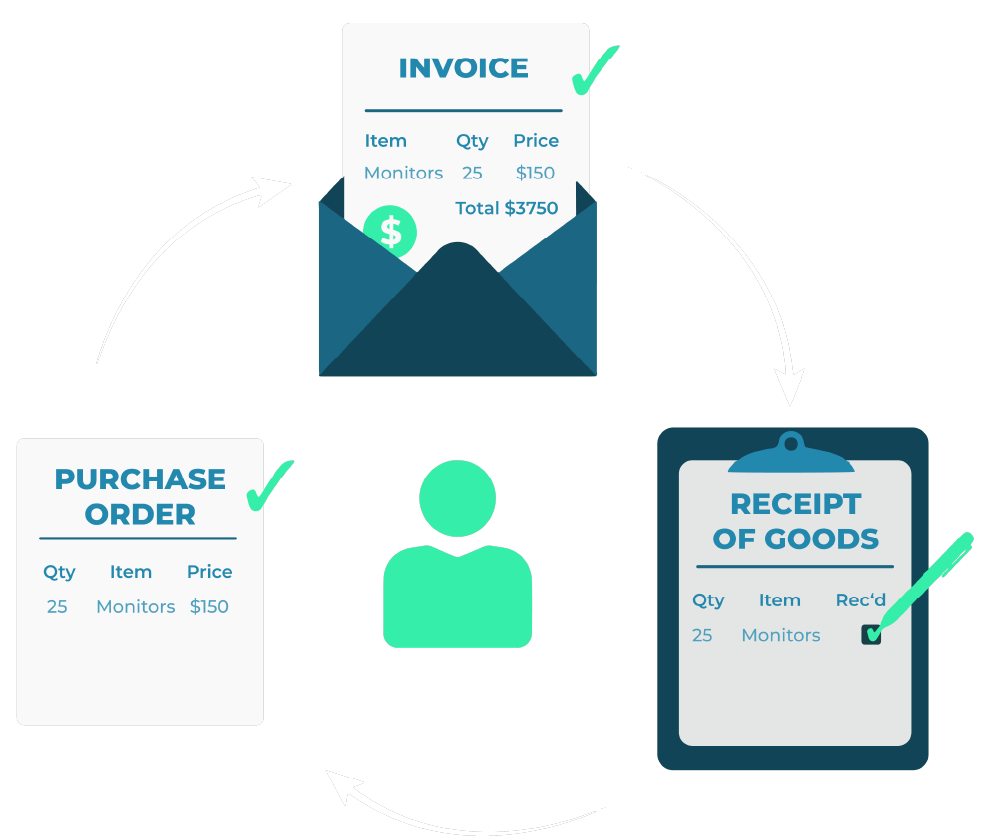
Automatic reconciliation of the purchase order, goods receipt note (GRN), and supplier invoice. Discrepancies are flagged and routed for exception handling; clean matches flow straight through to payment.

Native ERP integration

Real-time bidirectional data sync with your ERP system. This is the critical point where most generic procurement tools fall short: they support QuickBooks or NetSuite, but not Infor LN, Infor M3, or Infor CloudSuite — which is where many mid-market and manufacturing companies actually run their operations.

Spend visibility and audit trails

Centralized dashboards, real-time budget tracking, and complete documentation for compliance and auditing.

Which Are the Best Purchase Order Automation Software Solutions in 2026?

Here is an honest comparison of the leading solutions currently on the market — and where each one fits best.

DocBits — Best for Infor and SAP Environments with Complex Document Workflows

DocBits is an AI-powered procure-to-pay platform trusted by international companies and large enterprises on Infor LN, M3, and CloudSuite — as well as SAP. It covers the document-intensive side of the full procurement cycle: capturing and processing inbound purchase orders, automating approval workflows, matching invoices against POs and goods receipts, and posting directly into the ERP — across multiple entities, currencies, and countries, without manual re-entry at any step.

What sets DocBits apart is its native support for both Infor and SAP ecosystems — without additional middleware, combined with AI-powered document capture that handles real-world complexity: multi-line POs, varying supplier formats, handwritten annotations, and non-standard layouts. Its built-in PO Matching automatically reconciles supplier invoices against the purchase order and goods receipt line by line — clean matches post directly into the ERP, discrepancies are flagged instantly for review. End-to-end, in a single platform.

Best for: Companies of any size on Infor LN, M3, CloudSuite, or SAP — whether they need standalone PO automation or a full procure-to-pay solution with high-volume document processing and deep ERP-native integration across multiple entities and countries.

Coupa — Best for Enterprises Focused on Spend Management

Coupa is a comprehensive cloud-based spend management platform covering the full procure-to-pay lifecycle. Its strengths are AI-driven spend analytics and deep integration with enterprise ERPs like SAP and Oracle. For large organizations managing high transaction volumes across multiple entities and geographies, Coupa provides a broad layer of spend visibility and supplier network connectivity.

The platform includes tools for catalog management, contract compliance, and expense management. Implementation typically requires dedicated IT resources and a structured rollout process, which is worth factoring into the evaluation timeline and total cost of ownership.

Best for: Organizations whose primary need is spend governance and visibility across a large supplier network.

SAP Ariba — Source-to-Pay Suite for SAP Ecosystems

SAP Ariba is a broad source-to-pay suite designed for organizations running SAP S/4HANA or SAP ERP. Its Ariba Network supports guided buying, catalog management, contract compliance, and invoice matching — all tightly embedded within the SAP ecosystem.

The platform covers a wide functional scope, from strategic sourcing and supplier onboarding through to purchase order management and payments, making it a gut option for enterprises looking to manage the full procurement lifecycle within a single SAP-connected environment.  Implementation typically involves a structured rollout with dedicated IT and project resources, which is a factor to consider when planning timelines and total cost of ownership.

Best for: Enterprises running SAP who need a wide-ranging source-to-pay suite covering sourcing, supplier management, and contract compliance alongside purchase order automation.

Precoro — Best for Mid-Market Teams Without Complex ERP Requirements

Precoro is a focused procurement platform built for mid-sized organizations that need to automate PO creation, approval workflows, and basic three-way matching without the complexity of an enterprise suite. Its interface is clean, onboarding is fast, and the budget control features are genuinely useful for finance teams that need real-time spend visibility.

Integrations cover QuickBooks, Xero, and NetSuite. For companies on Infor or other manufacturing ERPs, native connectivity is not available.

Best for: Mid-market companies on mainstream accounting platforms looking for a straightforward PO management tool.

Best for Scaling Teams Prioritizing Usability

Procurify positions itself as a user-friendly procure-to-pay platform for mid-market organizations that want strong mobile accessibility and intuitive approval workflows. Real-time spend analytics, virtual spend cards, and solid integrations with NetSuite and QuickBooks make it a practical choice for companies that are growing and need procurement structure without heavy IT involvement.

Best for: Growing mid-market teams prioritizing ease of adoption and mobile-first approvals.

How Do the Leading PO Automation Tools Compare?

Feature DocBits Coupa SAP Ariba Precoro Procurify

Infor ERP integration

✅ Native

 SAP ERP integration

✅ Native
✅ Native

AI document extraction (IDP)

Partial
Partial

Three-way matching

Automated approval workflows

Touchless PO processing

Partial
Partial

Best fit

Infor & SAP any size
Spend management focus
SAP enterprise
SMB / mid-market
Mid-market

What Questions Should You Ask Before Choosing a PO Automation Solution?

The right answer depends entirely on your operating environment. Before shortlisting vendors, clarify the following.

Which ERP do you run?

This is the most important question. If your organization runs on Infor LN, M3, or CloudSuite, most generic PO automation tools will require custom integration work or manual export/import steps that undermine the efficiency gains. A platform with native Infor integration eliminates that friction entirely.

Where does your document complexity sit?

High-volume AP teams processing hundreds of supplier invoices and inbound POs monthly need AI-powered extraction that handles varying document formats without template setup per supplier. Teams with lower volume and consistent formats can work with simpler tools.

What are your compliance and audit requirements?

Regulated industries — manufacturing, public sector, healthcare — require immutable audit trails, role-based access controls, and automated three-way matching. Ensure the platform you select documents every touchpoint in the process.

What does your growth trajectory look like?

A platform that fits today’s transaction volume may not scale to tomorrow’s. Prioritize solutions with modular architectures that can expand from PO automation into full procure-to-pay coverage as your needs evolve.

How Does Purchase Order Automation Reduce Costs in Practice?

The efficiency case for PO automation is well-documented, but the specific gains depend on your starting point. For organizations moving from fully manual processes, the typical improvement profile looks like this:

  • Processing cost per PO drops from $50–$150 to $5–$20 through elimination of manual data entry and exception handling
  • Cycle time from requisition to approved PO shrinks from 3–7 business days to same-day or next-day for standard orders
  • Error rate in invoice matching falls from the 15–20% range typical of manual processes to under 7% with three-way matching automation
  • Audit preparation time decreases by up to 50% when all procurement events are documented automatically in the ERP

The return on investment accelerates when the automation layer is tightly coupled to the ERP. When PO data flows directly into the ERP without manual re-entry, the downstream gains extend to inventory management, financial reporting, and month-end close — not just the procurement team.

What Is the Best Purchase Order Automation Software for Your Business?

There is no single answer . The right purchase order automation software depends on your ERP landscape, your document volumes, and how much of the procurement cycle you want to automate.

What stands out in 2026 is that the strongest solutions are no longer just about generating POs — they cover the full document-intensive procurement cycle, integrate natively with the ERP, and eliminate manual work at every step. DocBits does exactly that, for both Infor and SAP environments: from inbound PO capture and approval workflows through to PO matching and direct ERP posting, without middleware, without manual re-entry, and without compromise on document complexity.

For organizations focused primarily on spend governance and supplier network management, Coupa or SAP Ariba offer relevant functionality within their respective ecosystems. For smaller teams on mainstream accounting platforms, Precoro and Procurify are straightforward options to consider.

But across the board, one thing is clear: manual PO processing is no longer a competitive option in 2026. The question is simply which platform fits your ERP, your team, and your ambition.

2-way and 3-way PO matching diagram – invoice, purchase order and receipt of goods matched automatically with DocBits
Curious? Simply ask us
Purchase order automation software dashboard showing AI-powered PO approval workflow

Image credits: Header- & featured image by FELLOWPRO

Share: