AP automation · Infor LN

Infor LN Invoice Automation — From Inbox to Posting

Your Infor LN stays in charge. DocBits handles the documents in front of it: capture, extraction, PO matching and approval — with over 96% accuracy, live within a few weeks.

Over 96% recognition accuracy

120+ languages

Most customers go live within weeks
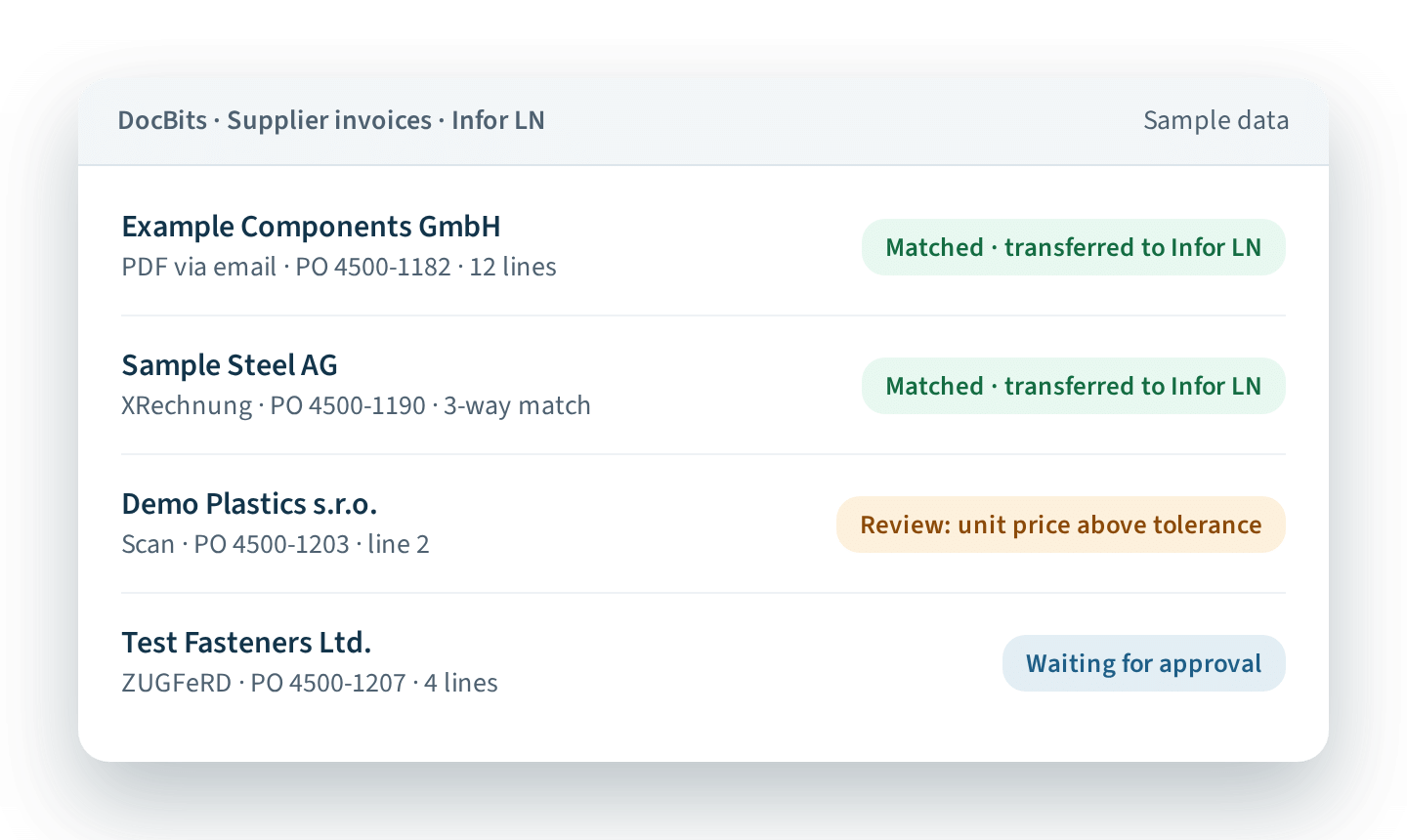
DocBits processing supplier invoices for Infor LN – matching, deviation and approval status (sample data)

Companies that rely on DocBits

Still keying supplier invoices into Infor LN?

If your accounts payable team still types in supplier invoices, chases approvals by email or spends hours matching purchase orders in Infor LN, you’re not alone. And you don’t have to stay stuck there.

It’s rarely Infor LN itself. It’s everything that happens before an invoice gets there: PDFs and scans in every supplier layout, e-invoices arriving alongside paper, approvers on holiday, and price differences that only surface when the month-end close is already due.

DocBits takes over exactly that part. Your team keeps working in Infor LN – just without the typing. More for accounting teams →

How it works in your Infor LN Process

Your suppliers keep sending invoices the way they do today. What changes is what happens next.

Invoices come in as usual

By email, scan or e-invoice – all in one inbox. Nothing changes for your suppliers.

DocBits reads and checks them

Intelligent document processing (IDP) – AI-based OCR without templates – captures header and line items with over 96% accuracy in over 120 languages, then checks them against your LN purchase orders and goods receipts.

 Invoice processing →

Your team handles the exceptions

Matching invoices need no manual work. Deviations and approvals go to the right person, based on your rules. 

Invoice approval →

Infor LN gets clean data

Checked invoices are handed over to Infor LN for posting and payment – without re-entry.

E-invoices included

XRechnung, ZUGFeRD, PEPPOL invoices land in the same inbox as your PDFs and run through the same process – no separate workflow. In Germany, businesses have had to be able to receive e-invoices since January 2025 (source: IHK). 

 E-Invoice processing →

Price and quantity differences caught early

DocBits compares every invoice line with the order and goods receipt in Infor LN – 2-way or 3-way, within the tolerances you set. You see deviations before posting, not at month-end. 

PO matching →

No duplicate supplier data

Your supplier master data stays in Infor LN. DocBits uses it to recognize suppliers and check invoices, so nobody maintains suppliers twice.

Your Invoice Process in Infor LN: Today vs. with DocBits

Manual process With DocBits

Data entry

Keyed in by hand
Extracted with over 96% accuracy

Formats

PDF, paper and e-invoices handled separately
One inbox and one process for all formats

PO matching

Checked line by line by the team
Automatic at line level, within your tolerances

Approvals

By email, status unclear
Rule-based routing with visible status

Exceptions

Mixed in with routine work
Flagged and routed to the right person

Audit trail

Spread across inboxes and folders
Every step documented per invoice

Built for AP Teams on Infor LN

It lives in your LN process

DocBits connects natively to Infor LN. Your team keeps posting and paying in LN as before – with checked data instead of typed data

Planned around your month-end close

Go-live is planned with your team around closing periods. Most customers are live within a few weeks, guided by a dedicated project manager

No templates to maintain

New supplier, new layout? DocBits reads invoices in any layout and over 120 languages – nothing to set up per supplier

Your finance data stays protected

DocBits is ISO 27001 certified and GDPR-compliant. Role-based permissions decide who sees and approves which invoices

Native integration with Infor LN — Your ERP stays in charge

Your IT team will ask what changes in Infor LN. The short answer: your LN processes stay as they are. DocBits works in front of them and hands over checked data.

No middleware, no custom code. DocBits connects natively to Infor LN.

Configured per company and document type. Data fields, document types and rules match your setup.

Role-based permissions. You decide who sees, approves or transfers which documents.

All LN-based CloudSuites. Works with Infor LN on CloudSuite Industrial Enterprise, CloudSuite Aerospace & Defense and CloudSuite Automotive.

Questions from your IT team?

What does what

1 · FROM INFOR LN

DocBits uses your LN data

  • Supplier master data
  • Purchase orders and goods receipt

2 · IN DOCBITS

DocBits does the document work

  • Invoice receipt in any format
  • Data extraction and validation
  • PO matching against your LN orders and recips
  • Exceptions and approvals

3 · BACK IN INFOR LN

LN does what it always does

  • Posting and payment
  • Financial system of record

See how much of that applies to your own invoice volume

Your Free DocBits Automation Check

Find out in 2 minutes how much automation potential your Infor LN document process has, based on your document volume, current capture method and biggest time drains around PO matching and approvals.

What Other Infor LN Teams Say

Sefar logo – DocBits reference customer

Over 90% of invoice data extracted automatically

Precision fabrics manufacturer · around 3,000 employees in 25 countries · running Infor LN

“DocBits is a clean and fully integrated software solution in Infor LN which promises a simple introduction and fast implementation.”
Sebastiaan van der Meij
Head Group Finance, Sefar AG

Read the Sefar story →

Büchi logo – DocBits reference customer in the laboratory technology industry

Laboratory technology manufacturer · running Infor LN

“DocBits is very intuitive and almost self-explanatory. You can simply click through it — no lengthy training required.”
Amar Bucan
BÜCHI

Read the BÜCHI story →

One Integration for Your P2P and O2C Documents

Invoices are usually where you start. With the same M3 integration, DocBits also automates the other documents in procure-to-pay (P2P) and order-to-cash (O2C):

PROCURE-TO-PAY (P2P)

Documents from your suppliers

Supplier order confirmations →

Checked against your LN purchase order before deviations turn into invoice problems

Delivery notes

Captured in the same platform

Handwritten documents →

Read without templates

ORDER-TO-CASH (O2C)

Documents from your customers

Customer purchase orders →

Captured in any format, approved and created as sales orders in Infor LN

Everything runs on one platform, in one interface, through one integration.

Running Infor M3 or Infor CSD? See DocBits for Infor M3 → and DocBits for Infor CSD →

Evaluating document automation? Start with the facts

PRICING

See how pricing works

Packages and the full price list – for your budget discussion

Get the price list →

COMPARISONS

Compare your options

How IDP platforms differ in ERP integration, matching and setup effort

Tungsten Automation alternatives

Medius alternatives

IDP platforms compared

CUSTOMER STORY

See results from real customers

How Sefar and BÜCHI work with DocBits in Infor LN

SEFAR case study

BÜCHI case study

Frequently Asked Questions ​

How can I automate invoice processing in Infor LN?

Connect an intelligent document processing (IDP) solution that captures invoices, extracts the data, matches it against LN purchase orders and hands validated data over to Infor LN. DocBits does this natively for Infor LN: invoices in any format are read with over 96% accuracy, matched at line level and routed for approval. Infor LN remains the system of record for posting and payment.

How do I integrate invoice processing with Infor LN?

Use a solution with a native Infor LN integration, so validated invoice data reaches LN without a separate middleware layer or custom scripts. DocBits connects directly to Infor LN: it uses LN supplier, purchase order and goods receipt data to check and match invoices, then hands them over to the standard LN process for posting and payment.

How does invoice matching work in Infor LN?

Invoice lines are compared with the corresponding purchase order lines (and, for 3-way matching, with goods receipts) on item, quantity and unit price. DocBits uses current purchase order and receipt data from Infor LN, matches each invoice line automatically within your tolerances and flags deviations for review before the invoice is handed over.

How can I process e-invoices like PEPPOL, XRechnung or ZUGFeRD in Infor LN?

Structured e-invoices are read from their XML data, validated and then processed like any other supplier invoice. DocBits receives PEPPOL, XRechnung and ZUGFeRD invoices in the same inbox as PDFs, matches them against Infor LN purchase orders and hands them over to LN. Since 2025, businesses in Germany must be able to receive e-invoices.

What is the best AP automation software for Infor LN?

The best fit depends on four points: whether the integration with Infor LN is native or needs middleware, whether matching runs at line level against LN purchase orders and receipts, which e-invoice formats are supported, and whether there are reference customers on Infor LN. DocBits covers all four: it integrates natively with Infor LN, matches at line level, supports PEPPOL, XRechnung and ZUGFeRD, and is used by LN customers such as Sefar and BÜCHI.

How can I automate supplier processes in Infor LN?

Most teams start with supplier invoices and then add order confirmations. DocBits reads both in any format, checks them against purchase orders in Infor LN and flags deviations. Supplier master data stays in LN and is used automatically for supplier recognition, so nobody maintains suppliers twice. Optionally, suppliers can submit invoices through a supplier portal.

How can I automate document processing in Infor LN?

With an intelligent document processing (IDP) solution connected to Infor LN. Typical documents are supplier invoices, incoming purchase orders, order confirmations and delivery notes. DocBits processes all of them through the same Infor LN integration: it reads the data in any format, checks it against LN data and hands it over to Infor LN.

How can I automate order-to-cash (O2C) in Infor LN?

Order-to-cash in Infor LN starts with incoming customer orders. DocBits captures them from any format – PDF, email or scan – extracts the order data, routes it for approval and creates the sales order in Infor LN.

How can I automate order confirmations in Infor LN?

Supplier order confirmations are compared with the original purchase order in Infor LN – items, quantities, prices and delivery dates. DocBits reads confirmations in any format, matches them against your LN purchase orders automatically and flags deviations, so your purchasing team only handles the differences.

Which AP automation works with Infor CloudSuite Aerospace & Defense or Automotive?

DocBits works with Infor LN in all LN-based CloudSuites, including Infor CloudSuite Industrial Enterprise, CloudSuite Aerospace & Defense and CloudSuite Automotive. In each suite it uses the same native LN integration, so invoices, order confirmations and customer orders are processed the same way regardless of the industry suite.

See DocBits in Your Infor LN Process

Bring a few of your own supplier invoices — PDFs, scans or e-invoices. In 60 minutes via Teams, we process them live, show the PO matching against Infor LN and answer your team’s questions. In English or German.