

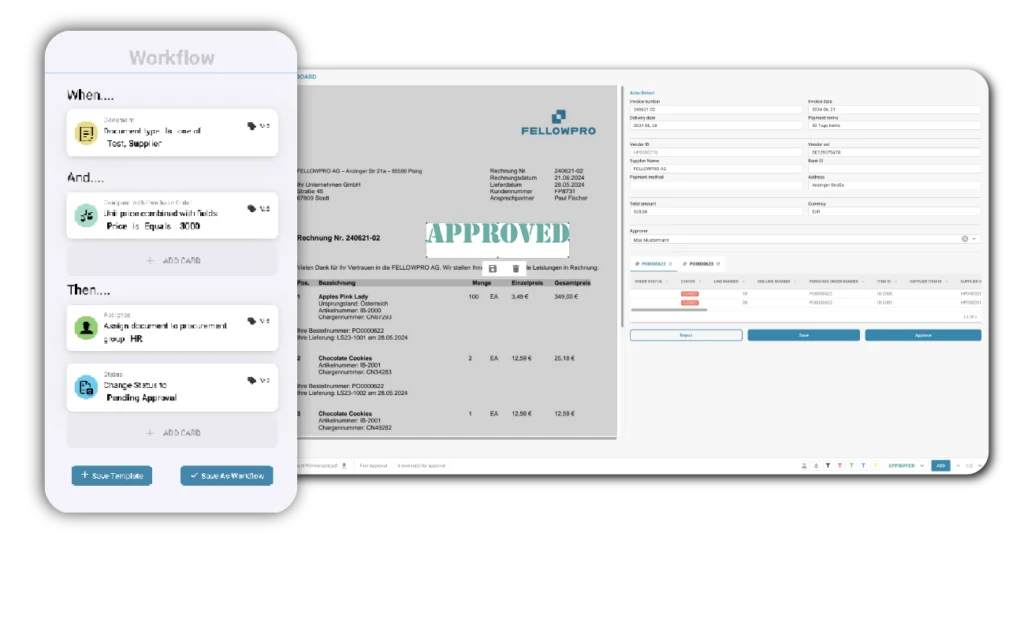

Stop chasing approvers. Your invoice approval workflow should run itself — from inbox to ERP, fully automated and traceable.
You receive a cost invoice. You forward it by email, wait for a response, send a reminder, get a partial answer, re-route it — and by the time it’s actually approved, a week has passed. Your supplier is following up. Your team has touched the same document five times.
This is not an edge case. For finance teams processing high volumes of invoices without a structured approval process, this is Tuesday.
The consequences add up fast: late payment penalties, strained supplier relationships, missing audit trails, and a finance team spending its time on status emails instead of strategic work.
A well-designed invoice approval automation changes all of this — not by adding another tool, but by removing the manual steps that are slowing you down.
When your invoice approval workflow runs on automation, every step happens in the right order, with the right person, at the right time. Here is what that looks like in practice:
Whether invoices come in by email or direct upload, they are captured, classified, and extracted automatically. Supplier, amount, cost center, line items — all pulled without manual data entry, across PDF, scanned documents, and e-invoice formats.
No more downloading attachments. No more re-typing data. Your team picks up where it actually matters.
Before an invoice moves forward, your finance team validates the extracted data, assigns the correct cost center, and selects the right approver.
All of this happens in one place — no switching between systems, no manual ERP lookups, no guesswork.
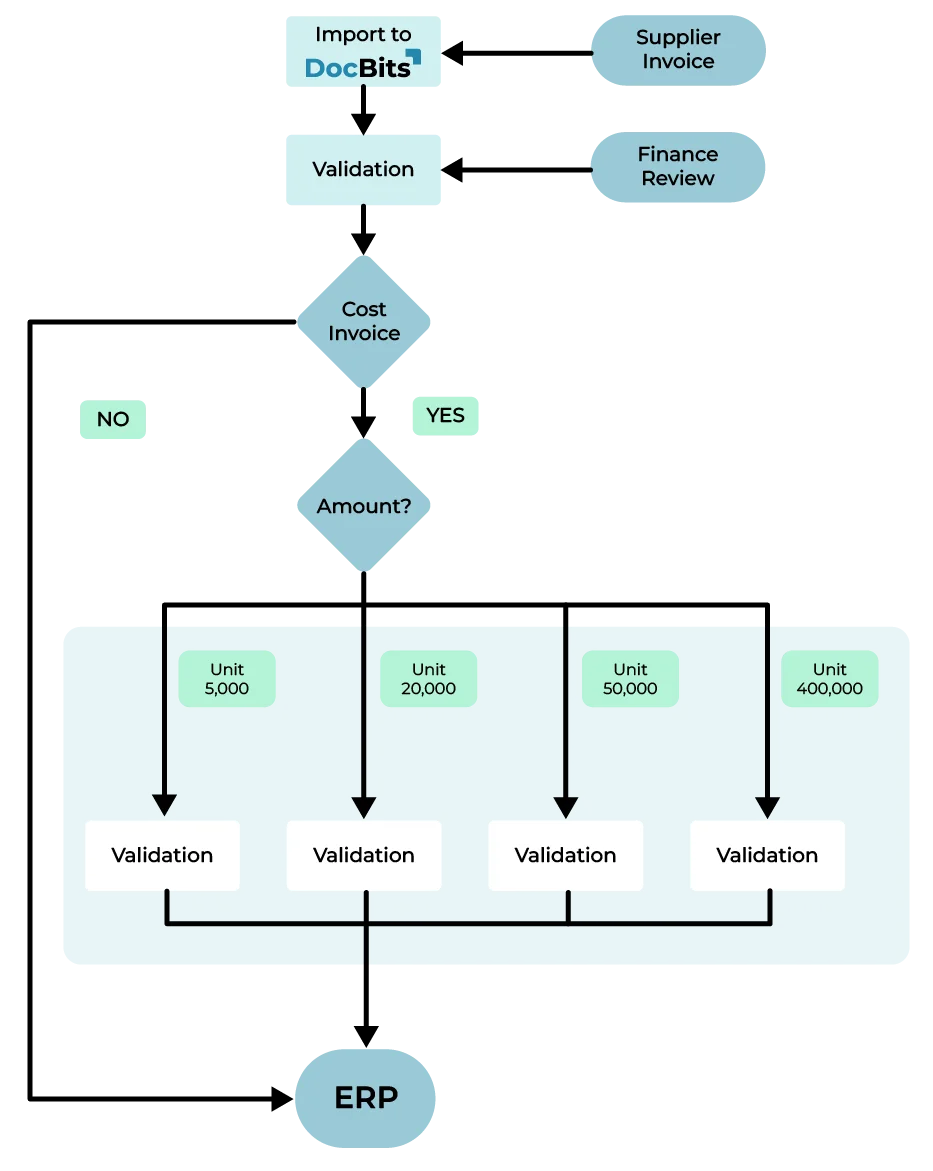
Based on the invoice amount, cost center, and your predefined rules, each invoice is routed to the right approver automatically. They receive an email with everything they need — invoice details, context, and a direct link to approve or reject. If they don’t respond in time, a reminder goes out automatically. Your finance team doesn’t have to chase anyone.
Once approved, invoices are exported directly to SAP, Infor LN, M3, or CloudSuite — no manual posting, no duplicate entry. Rejected invoices are archived in Infor IDM with full documentation. Every step of the process is logged and traceable.
The impact of a well-structured invoice approval automation isn’t just about speed. It changes how your finance team works day to day.
Fewer delays, faster payments: Invoices no longer sit in inboxes waiting for a response. Approval cycles that used to take days are completed in hours — which means suppliers get paid on time and early payment discounts don’t slip through.
Full visibility at every step At any moment: You can see exactly where an invoice is, who has it, and what action is pending. No more “I thought you had it” conversations.
An audit trail that actually holds up Every approval: Rejection, and status change is recorded with timestamp and user. When auditors or controllers ask for documentation, it’s all there — without anyone having to reconstruct it manually.
Approval rules that match your organization: You define the thresholds. You assign the approvers. You configure multi-level chains for higher amounts or specific cost centers. And you can adjust the rules at any time — without involving IT.
A process that scales with your business: Whether you’re processing 200 invoices a month or 2,000, the workflow handles it. Your team focuses on exceptions and decisions — not on routing and reminders.
Not all invoices follow the same route — and your approval process shouldn’t treat them as if they do.
Purchase order invoices can be validated automatically against the matching PO and exported to your ERP once confirmed. The process is fast because the data is already there.
Cost invoices — for services, subscriptions, or one-off purchases without a purchase order — require a different approach. Someone needs to review them, assign a cost center, and get the right person to sign off before anything gets posted.
This is exactly where most manual processes break down. And it’s exactly what the invoice approval routing in this workflow is designed to handle: structured, configurable, and fully integrated with your ERP — so cost invoices don’t become a separate problem that falls outside your normal process.
If your ERP environment is built on SAP or Infor, you know that the value of any automation depends entirely on how well it integrates. A process that requires manual data transfer, workarounds, or separate reconciliation isn’t really automation — it’s just a different kind of manual work.
The invoice approval workflow described here connects natively to Infor LN, Infor M3, and Infor CloudSuite. Approved invoices are posted directly. Rejections are documented in Infor IDM. Approval statuses, cost center assignments, and workflow history are all synchronized in real time — so your ERP data stays accurate without anyone having to keep it that way.
No middleware, no complex implementation, no disruption to the financial processes you already have in place.
Yes. Modern AI-powered systems can handle the entire invoice approval workflow automatically — from extracting invoice data and assigning cost centers to routing invoices to the right approvers and posting approved invoices directly into your ERP. What used to take days of manual back-and-forth can run without a single email.
Yes. Invoice approval software automates the routing, notification, and documentation of invoices through a defined approval process. Instead of forwarding invoices manually by email, the system routes each invoice to the right approver based on rules you define — amount thresholds, cost centers, departments — and tracks every step automatically.
The most effective approach is automating the approval workflow. With a structured invoice approval automation in place, invoices are routed, approved, and posted without manual intervention — allowing finance teams to handle significantly higher volumes without adding headcount. The key is a system that integrates directly with your ERP so there’s no duplicate data entry or manual reconciliation.
The most important criteria are: native ERP integration (so approved invoices are posted automatically without manual transfer), configurable approval rules (amount thresholds, multi-level chains, cost center routing), a complete audit trail for compliance, and automated notifications so approvers don’t need to be chased. If your organization runs Infor LN, M3, CloudSuite, or SAP, ERP-native integration should be your first filter.
General workflow tools can be configured to route approvals, but they require significant setup and rarely integrate natively with ERP systems. Dedicated invoice approval software comes with built-in document extraction, ERP connectors, and finance-specific logic — such as PO matching and cost invoice routing — out of the box. The result is faster implementation and fewer workarounds.
Implementation time depends on the complexity of your approval rules and your ERP environment. Solutions with native ERP connectors — particularly for Infor LN, M3, CloudSuite, or SAP — can typically go live within a few weeks. The main setup steps are defining approval thresholds, assigning approvers by cost center or department, and connecting the system to your ERP.
DocBits connects natively to Infor LN, Infor M3, Infor CloudSuite, and SAP. Approved invoices are exported directly into the ERP; rejected invoices are archived in Infor IDM. Approval rules, cost center assignments, and workflow history are all managed within DocBits and synchronized with your ERP environment in real time — no middleware, no manual data transfer.
DocBits handles both purchase order-related invoices and cost invoices. PO invoices are validated automatically against the matching purchase order and exported once confirmed. Cost invoices — without a linked PO — follow a configurable approval routing process: cost center assignment, approver selection, multi-level escalation if needed, and direct ERP export after final approval.
Your finance team’s time is better spent than chasing approvers and tracking invoice statuses. A structured, automated invoice approval workflow gives them that time back — and gives your business the visibility, compliance, and speed it needs.
See what this looks like for your specific setup. Book a demo and we’ll walk you through the workflow for your Infor environment.
You are currently viewing a placeholder content from Vimeo. To access the actual content, click the button below. Please note that doing so will share data with third-party providers.
More InformationYou are currently viewing a placeholder content from YouTube. To access the actual content, click the button below. Please note that doing so will share data with third-party providers.
More InformationYou need to load content from reCAPTCHA to submit the form. Please note that doing so will share data with third-party providers.
More InformationYou are currently viewing a placeholder content from Vimeo. To access the actual content, click the button below. Please note that doing so will share data with third-party providers.
More InformationYou are currently viewing a placeholder content from YouTube. To access the actual content, click the button below. Please note that doing so will share data with third-party providers.
More InformationYou are currently viewing a placeholder content from Bunny Stream. To access the actual content, click the button below. Please note that doing so will share data with third-party providers.
More InformationYou are currently viewing a placeholder content from Wistia. To access the actual content, click the button below. Please note that doing so will share data with third-party providers.
More InformationYou are currently viewing a placeholder content from Facebook. To access the actual content, click the button below. Please note that doing so will share data with third-party providers.
More InformationYou are currently viewing a placeholder content from Instagram. To access the actual content, click the button below. Please note that doing so will share data with third-party providers.
More InformationYou are currently viewing a placeholder content from X. To access the actual content, click the button below. Please note that doing so will share data with third-party providers.
More Information