

Automated Purchase Order Processing — Powered by AI

DocBits reads, extracts and transfers purchase order data into your ERP automatically — no manual entry, no errors, no delays.

Why Manual Purchase Order Processing Is Holding Your Team Back

Every purchase order that lands in your inbox as a PDF, email or scanned document costs time. Your team reads it, re-types the data, checks it against your ERP records — and does it again for the next one. And the one after that.

The problem isn’t your team. It’s the process.

Companies processing high volumes of purchase orders manually face the same bottlenecks: slow throughput, costly data entry errors, and a direct link between order volume and headcount. When business grows, the workload grows with it — unless you automate.

The real cost of manual PO handling

  • Data entry errors that trigger disputes and delays
  • Hours spent on repetitive extraction from PDFs and scanned documents
  • Approval bottlenecks because data isn’t in the system yet
  • No scalability — more orders mean more staff, not more efficiency

How DocBits Automates Your Purchase Order Processing

DocBits combines artificial intelligence, machine learning and optical character recognition (OCR) to handle the entire PO intake process — from the moment a document arrives to the moment clean, validated data lands in your ERP.

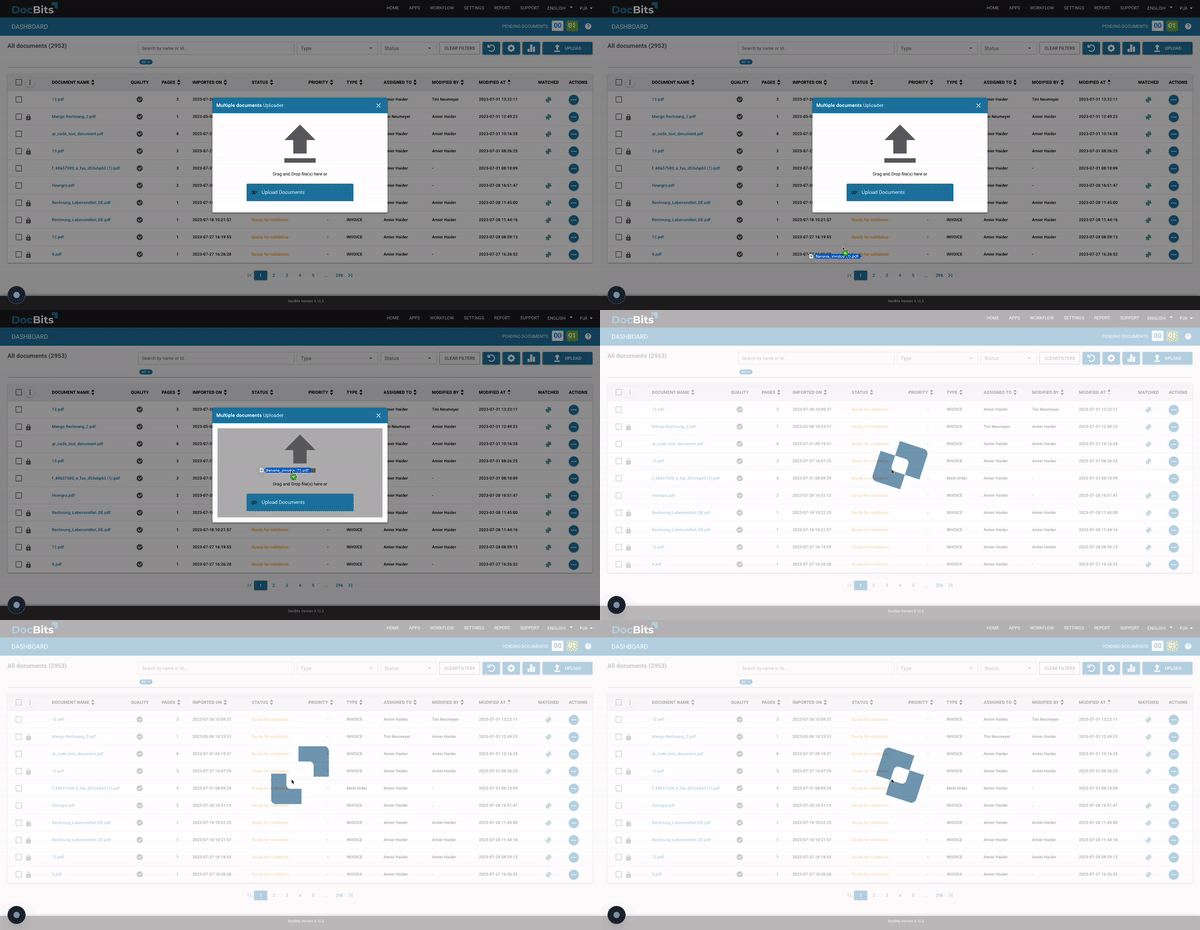
DocBits dashboard showing automated invoice import — drag and drop document upload interface

AI-powered data extraction from any PO format

Purchase orders arrive in different formats: PDFs, scanned paper documents, emails, even Excel files. DocBits reads them all. The AI identifies and extracts every relevant field — order number, item descriptions, quantities, prices, delivery terms and payment conditions — regardless of layout or sender.

No templates. No manual mapping. No exceptions.

Automated PO validation and three-way matching

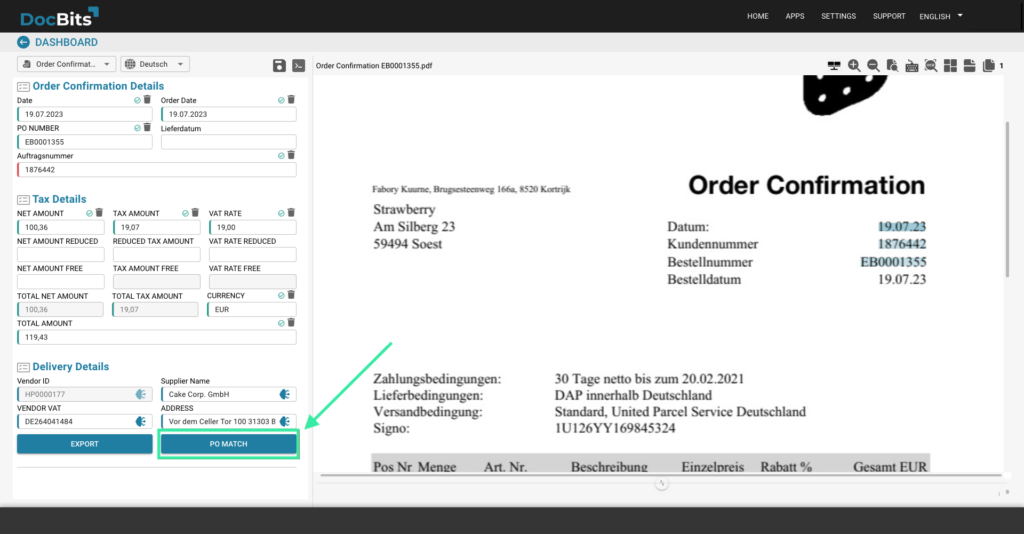
Extracted data is automatically validated against your existing ERP records. DocBits flags discrepancies — mismatched quantities, unknown item numbers, pricing deviations — before they become problems. Combined with DocBits’ built-in PO Matching feature, you get full three-way matching between purchase order, goods receipt and invoice.

DocBits dashboard showing automated PO validation and three-way matching between purchase order, goods receipt and invoice
DocBits ERP integration – puzzle pieces symbolizing seamless connection with Infor and SAP

Seamless ERP integration — Infor LN, M3, CloudSuite and SAP

DocBits integrates natively with Infor LN, Infor M3, Infor CloudSuite and SAP. Validated PO data is transferred directly into your ERP — no middleware, no manual re-entry, no interface friction. Your purchasing team works in the systems they already know.

What a Purchase Order Contains — and Why Every Field Matters

Purchase orders are not legally bound to a specific format, which means they arrive differently from every supplier. DocBits handles that variability automatically. Here is what a complete purchase order typically contains — and what DocBits extracts from each section.

General data

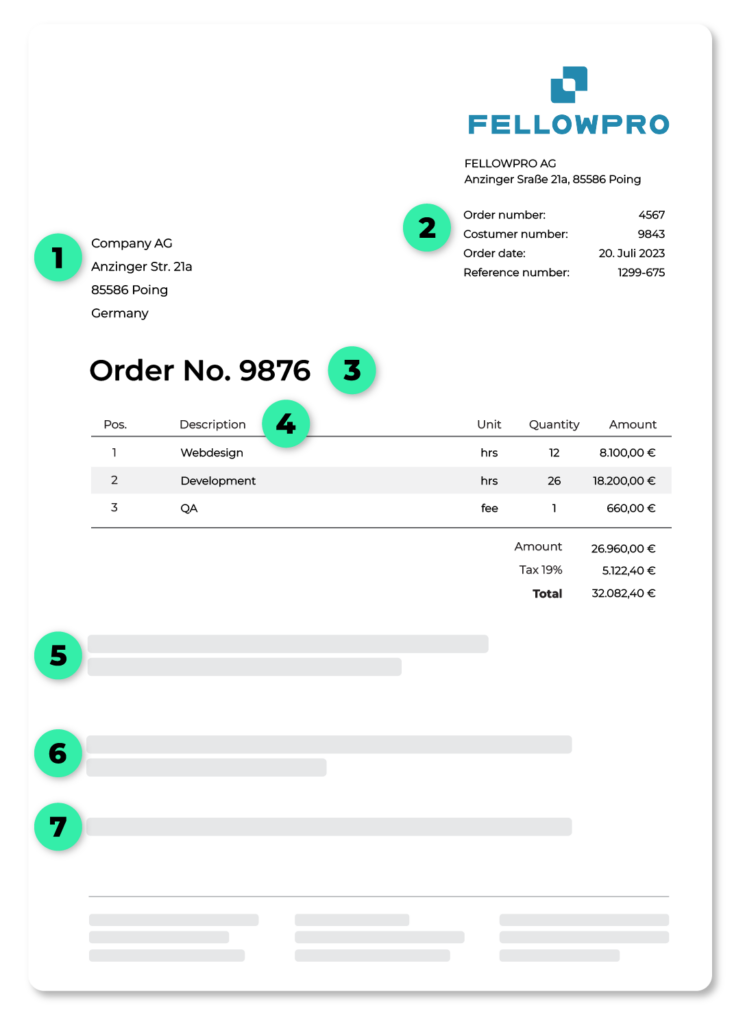
Contact details of the ordering company, billing address, delivery address (which may differ) and order date. DocBits captures and maps all address fields, even when formats vary between suppliers.

Order reference and order number

A clear reference to the preceding offer or contract, plus the unique order number. DocBits extracts these identifiers and uses them to link the PO to the correct records in your ERP.

Item descriptions and line items

All ordered items including item number, description, quantity and unit price. This is where most manual processing time is spent — and where DocBits delivers the greatest efficiency gain through automatic table extraction, even from complex multi-line documents.

Annotated purchase order document showing seven key data fields extracted by DocBits — including order number, line items, delivery and payment terms

Delivery and payment terms

Shipping method, delivery date, transport costs, payment method, payment deadlines and applicable discounts. DocBits extracts these fields and routes documents with missing or ambiguous terms for targeted human review — instead of holding up the entire process.

Terms of payment

Under payment terms, for example, the payment method, payment deadlines and, if applicable, discounts and rebates are recorded.

Reference to the GTCs, if applicable

Under certain circumstances, reference to the general terms and conditions is required.

The Benefits of Purchase Order Automation with DocBits

Manual processing With DocBits

Processing time per PO

8 – 12 minutes
Under 1 minute

Error rate

High (manual entry)
Near-zero (AI-validated)

ERP Integration

Copy & paste
Automatic, native

Scalability

Linear (more orders = more staff)
Independent of volume

Supported formats

Limited
PDF, scan, email, Excel

Process purchase orders faster, with fewer errors, at any volume — without expanding your team.

Frequently Asked Questions

Which software can automate purchase order processing?

There are several solutions on the market, but they differ significantly in scope. Generic automation tools handle basic workflows but struggle with varied document formats. Purpose-built IDP platforms like DocBits go further — using AI and OCR to extract data from any PO format and posting it directly into your

ERP (Infor LN, M3, CloudSuite or SAP) without manual re-entry or middleware.

What should I look for in purchase order automation software?

The most important criteria are native ERP integration, the ability to handle varied supplier formats without manual template setup, built-in validation and three-way matching, and a clear audit trail. Generic document tools often fall short on ERP depth — purpose-built solutions like DocBits transfer validated PO data directly into Infor LN, M3, CloudSuite or SAP without middleware.

How quickly can purchase order automation be implemented?

Implementation timelines vary by ERP environment and document volume, but cloud-based solutions like DocBits are typically up and running within a few weeks. Native ERP connectors remove the need for lengthy custom integrations, which is one of the main reasons companies choose a purpose-built solution over a generic automation tool.

Can DocBits handle purchase orders from any supplier, regardless of format?

Yes. DocBits uses AI and OCR to read purchase orders in any layout — PDFs, scanned documents, emails and Excel files — without requiring supplier-specific templates. The AI adapts automatically, even when a supplier changes their document format.

Does DocBits support three-way matching for purchase orders?

Yes. DocBits’ built-in PO Matching feature automatically matches purchase orders with goods receipts and supplier invoices. Discrepancies are flagged for review before they reach your ERP — preventing overpayments and duplicate entries.

Is DocBits compatible with Infor LN, Infor M3 and SAP?

Yes. DocBits integrates natively with Infor LN, Infor M3, Infor CloudSuite and SAP. Validated purchase order data is posted directly into your ERP — no manual re-entry, no export/import workarounds.

Does DocBits only handle purchase orders?

No. DocBits is a full intelligent document processing platform. In addition to purchase orders, it automates invoice processing, order processing and handwritten forms — covering the entire document workflow for finance and procurement teams.

Ready to eliminate manual purchase order processing?

See DocBits in action — book a personalized demo and we’ll show you exactly how it fits into your ERP environment.