














Automate Your Order Confirmation Processing — From Receipt to ERP Posting

DocBits provides you with the tools to take your document processing to the next level.

Your purchasing team receives order confirmations every day — by email, as a PDF attachment, sometimes still by fax. Someone opens each one, checks item numbers, quantities and prices against the original purchase order, and re-enters everything into your ERP. If there’s a discrepancy, the back-and-forth with the supplier begins.

Meanwhile, production planning is waiting. And your team is buried in paperwork.

DocBits automates this entire flow. From the moment an order confirmation arrives to the point it’s matched and posted in Infor or SAP — without manual data entry, without delays, without errors slipping through.

How DocBits Automates Your Order Confirmation Processing

Step 1 — Receipt & Capture

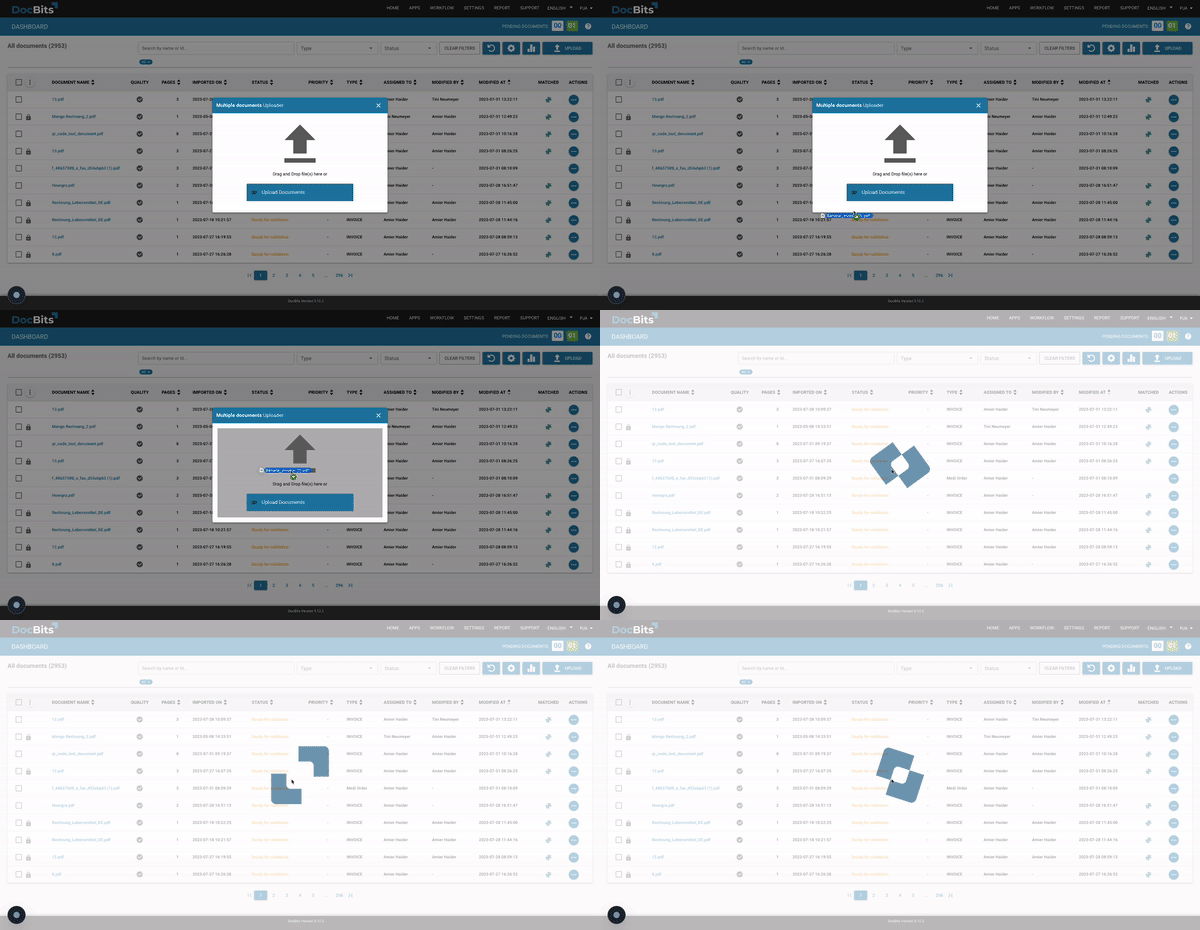
DocBits receives incoming order confirmations automatically — via email, SFTP, scanner or API. It doesn’t matter whether your suppliers send structured PDFs, scanned documents or EDI files. DocBits handles them all, in over 120 languages, from day one.

No manual upload. No sorting. No missed confirmations sitting in someone’s inbox.

DocBits dashboard — automatic receipt and capture of incoming order confirmations via email, SFTP, scanner or API

Step 2 — AI Data Extraction

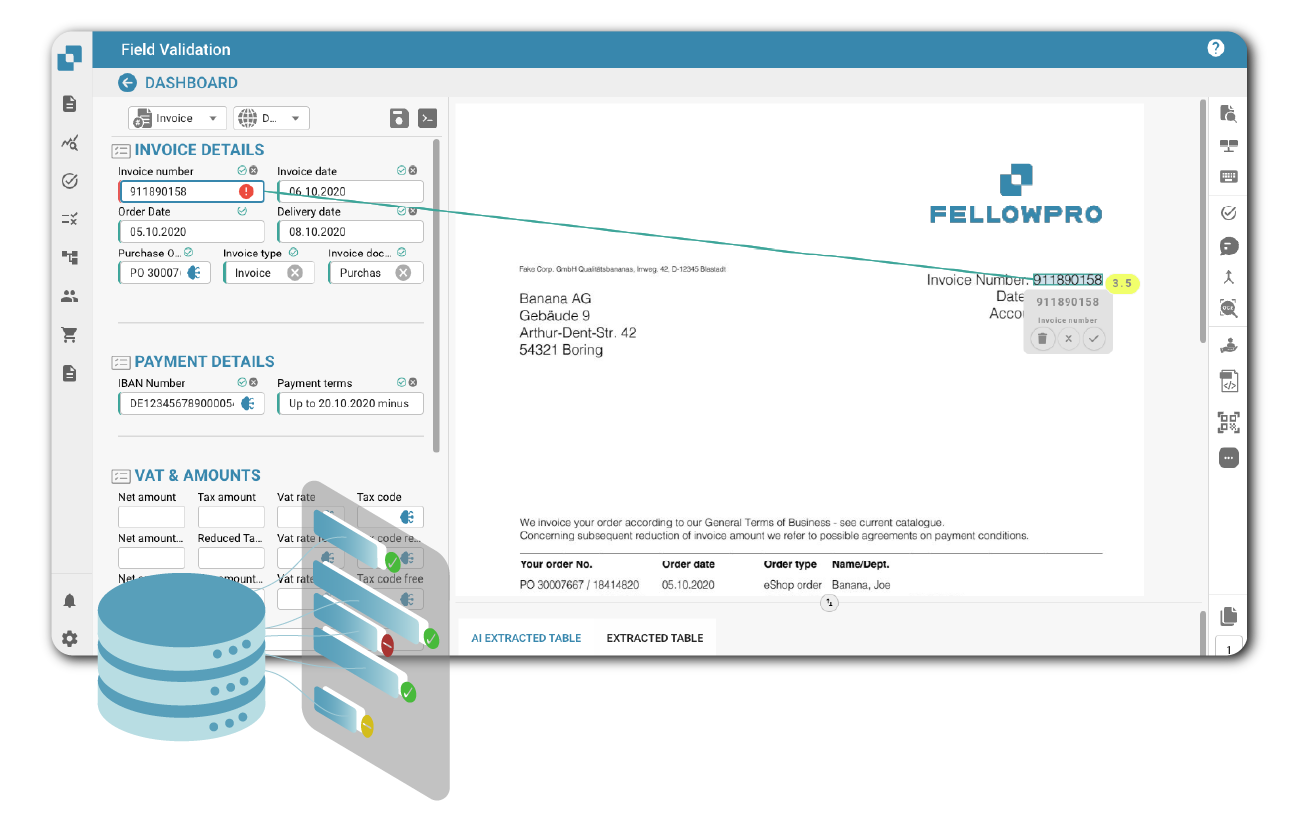
DocBits’ self-learning AI reads every order confirmation and extracts all relevant fields automatically: supplier details, order reference number, item numbers, quantities, unit information, prices, delivery dates and freight costs.

This includes complex multi-line tables — even when your supplier’s item numbers differ from your internal material numbers, or when descriptions vary across suppliers. DocBits handles it all with over 96% extraction accuracy, without templates or manual configuration.

Step 3 — Automatic Matching Against Your Purchase Order

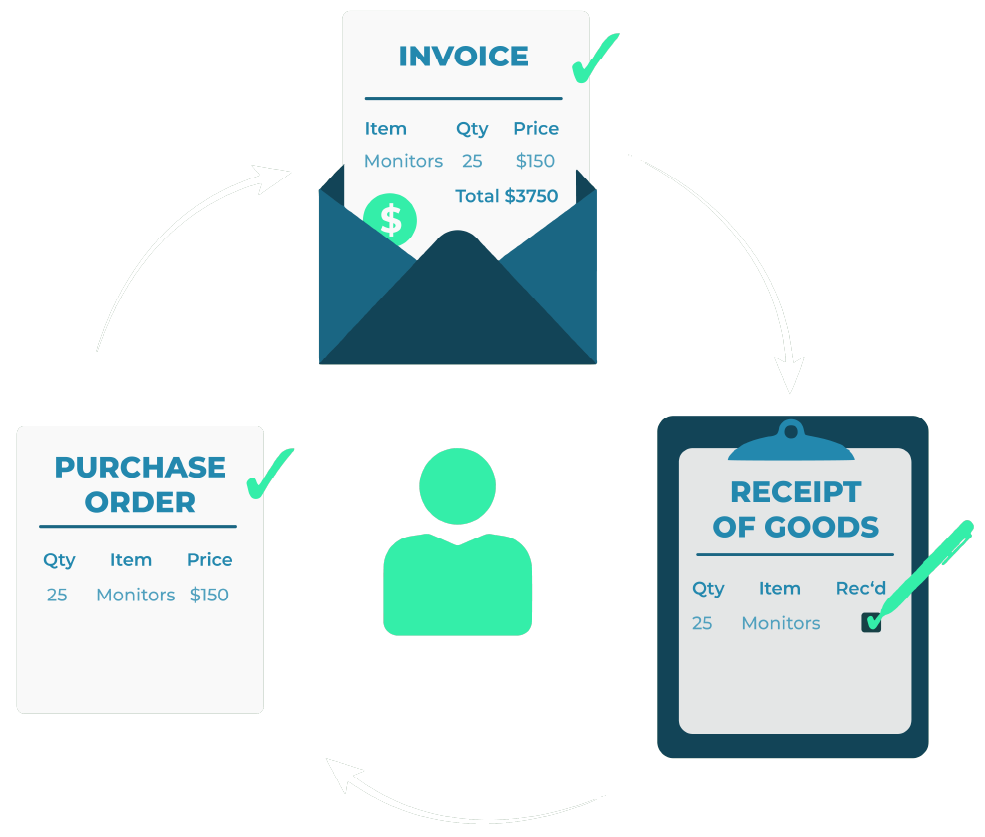
Every extracted line item is automatically compared against the original purchase order in your ERP — at line-item level. Price deviations, quantity differences, changed delivery dates, missing positions: DocBits detects them instantly and flags them for review.

Confirmations that match fully are processed automatically. No human touch required.

DocBits automatically matches order confirmations against purchase orders at line-item level — quantities, prices and delivery dates compared in seconds

Step 4 — Exception Handling & Workflow

When a discrepancy is detected, DocBits doesn’t just flag it — it routes the confirmation directly to the responsible employee, with everything they need to resolve it in one view: the original PO, the order confirmation, the exact delta, and the supplier contact.

No searching across systems. No forwarding emails manually. The right person gets the right information at the right moment.

Step 5 — ERP Posting & Audit-Compliant Archiving

Once validated, DocBits posts the order confirmation directly into your ERP. All document data is transferred in the correct format — no export, no copy-paste, no manual booking.

Every confirmation is archived audit-compliantly and remains traceable at any time, directly from your ERP system.

DocBits posts validated order confirmations directly into Infor or SAP — audit-compliant archiving with full traceability

What Changes When You Automate Order Confirmation Processing

Without DocBits With DocBits
Manual re-entry of every confirmation into ERP
AI extracts and transfers all data automatically
Discrepancies only caught at invoice stage
Deviations flagged at the moment of confirmation receipt
Hours spent per exception case
Exceptions routed automatically with full context
No overview of open confirmations
Full order confirmation ledger with real-time status
Delayed production planning
Immediate visibility into delivery commitments
Errors in ERP booking
96 %+ extraction accuracy, direct ERP posting

Native Integration with Infor and SAP — No Middleware

Most order confirmation automation tools are built for SAP. If your company runs on Infor, you’re usually left with a generic API connection — or a costly middleware layer.

DocBits integrates natively with:

  • Infor LN — direct integration into your purchasing and procurement workflow
  • Infor M3 — full support for M3-based procurement processes
  • Infor CloudSuite — cloud-native, no on-premises infrastructure needed
  • SAP — including S/4HANA

Data from every order confirmation is transferred directly into your ERP in the correct format. No separate connector required. No manual mapping. No additional vendor to manage.

Learn more about our Infor LN integration

Learn more about our Infor M3 integration

DocBits ERP integration – puzzle pieces symbolizing seamless connection with Infor and SAP

What DocBits Extracts from Every Order Confirmation

DocBits automatically captures all standard fields from incoming order confirmations — regardless of layout or supplier:

Supplier name, contact details & company address

Sender, recipient and contact person — automatically assigned to the correct supplier record in your ERP.

Order reference number & confirmation date

Linked to the original purchase order for full traceability from day one.

Expected delivery date & delivery terms

Instantly visible — so production planning knows what's confirmed and what isn't.

Full item list

Item numbers, descriptions, quantities, units of measurement Including complex multi-line tables and mixed item descriptions across different suppliers.

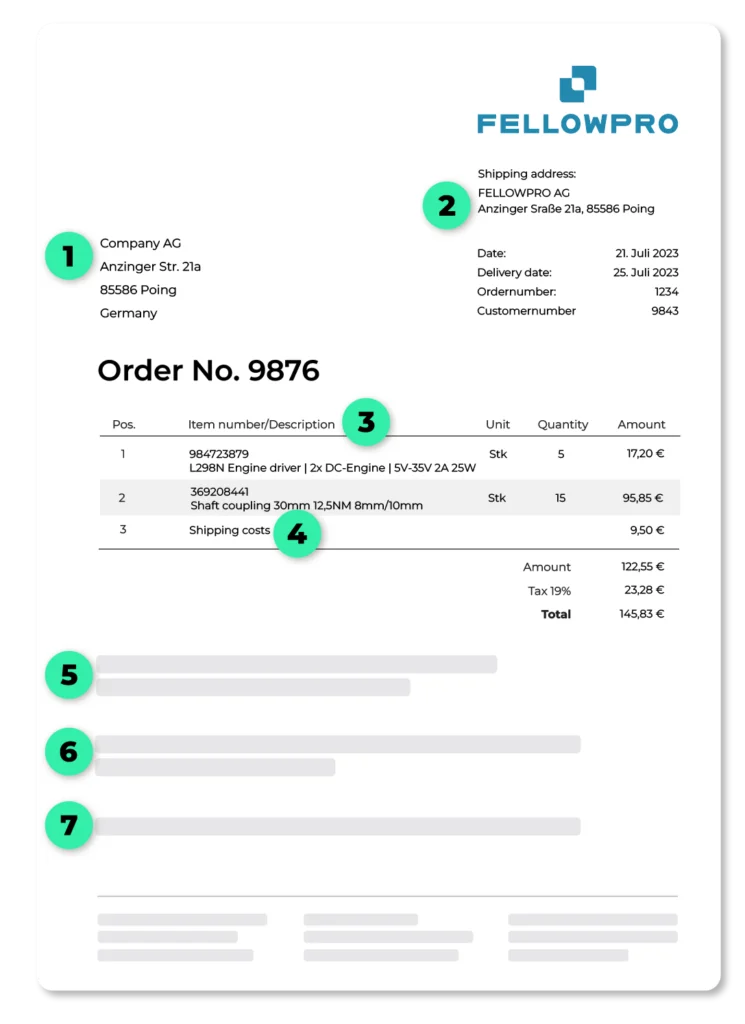
DocBits extracts all fields from incoming order confirmations automatically — supplier details, item numbers, quantities, prices, delivery dates and payment terms, regardless of supplier layout

Customer & supplier item numbers

Side by side DocBits maps your internal material numbers to supplier item numbers automatically.

Unit prices, total prices, freight & packaging costs

Every figure compared against the original PO — deviations flagged immediately.

Payment terms, discounts & rebates

Captured and transferred directly into your ERP — no manual re-entry.

Retention of title & GTC references

Documented and archived for compliance and audit purposes. Including complex multi-line tables, mixed item descriptions and varying formats across your entire supplier network.

Real stories, real successes

Trusted by 200+ Companies

Part of Your Complete Purchase-to-Pay Workflow

Order confirmation automation is one piece of a larger puzzle. DocBits covers your entire procure-to-pay document chain — on a single platform, with a single integration:
  • Purchase Order Automation — automated processing of outgoing POs and incoming supplier responses
  • Order Confirmation Automation — you are here
  • Invoice Processing — automated invoice capture, GL coding, PO matching and approval workflows
  • PO Matching — 2-way and 3-way matching at line-item level
  • Supplier Portal — your suppliers upload documents, track order status and communicate in one place

One platform. One integration. One team to work with.

Frequently Asked Questions About Order Confirmation Processing

Is there software that automatically processes incoming order confirmations from suppliers?

Yes. AI-powered document processing platforms like DocBits automatically receive, read and extract all data from incoming order confirmations — item numbers, quantities, prices, delivery dates — and match them against the original purchase order in your ERP. Discrepancies are flagged immediately, without any manual data entry. This type of software is called order confirmation automation or intelligent document processing (IDP).

How do companies automate the matching of order confirmations against purchase orders?

Companies use AI-based document processing software that integrates directly with their ERP system. When an order confirmation arrives — by email, PDF or EDI — the software automatically extracts the data and compares it line-by-line against the open purchase order. Matches are posted automatically; discrepancies are routed to the responsible employee for resolution. This eliminates the manual checking process and significantly reduces processing time and error rates.

What are the biggest problems with processing order confirmations manually?

Manual order confirmation processing is time-consuming, error-prone and creates delays across the entire procurement workflow. Common problems include: missed price or quantity deviations that only surface at invoice stage, no central overview of open confirmations, slow response times when suppliers change delivery dates, and high staff workload for repetitive data entry. Automation eliminates all of these bottlenecks.

Which software solutions automate order confirmation processing for Infor ERP users?

For companies running Infor LN, Infor M3 or Infor CloudSuite, DocBits is one of the few solutions with native ERP integration — meaning data is transferred directly into Infor without middleware or manual export steps. Most other order confirmation automation tools focus primarily on SAP and offer only generic interfaces for Infor environments.

What should I look for when choosing order confirmation automation software?

The most important criteria are: native integration with your ERP system (not just a generic API), line-item level matching accuracy, handling of complex tables and multiple document formats, exception workflow routing, and audit-compliant archiving. For Infor users specifically, native Infor LN and M3 integration is a critical differentiator — many solutions require costly middleware to connect.

How does DocBits compare to other order confirmation processing solutions?

DocBits differentiates itself in three key areas: first, native integration with Infor LN, Infor M3 and Infor CloudSuite — most competitors focus on SAP only; second, a single platform covering the complete purchase-to-pay process, from order confirmations to invoice processing and PO matching, without needing separate tools; third, self-learning AI that continuously improves accuracy across all customers via swarm intelligence, reaching 96%+ extraction accuracy from day one.

Can one platform handle both order confirmation processing and invoice automation?

Yes — and this is a significant advantage over point solutions. DocBits handles the complete purchase-to-pay document chain on a single platform: purchase orders, order confirmations, delivery notes and invoices. This means one integration, one interface, one vendor — and consistent data quality across the entire procurement workflow.

Does DocBits work with our Infor M3 / Infor LN environment out of the box?

Yes. DocBits has been developed with native integration for Infor M3, Infor LN and Infor CloudSuite. Implementation does not require custom development or middleware — the integration is pre-built and validated across 200+ customer environments. Your team can typically go live within weeks, not months.

How long does it take to implement DocBits for order confirmation processing?

DocBits is designed for fast deployment. Because it requires no templates and the AI learns from day one, most customers are fully operational within a few weeks. The native Infor and SAP integrations eliminate the longest part of typical implementation projects — ERP connectivity.

Is DocBits suitable for mid-sized manufacturing or industrial companies?

Yes — DocBits is specifically designed for mid-sized to large companies with high document volumes, complex supplier networks and ERP-centric operations. The platform is used across manufacturing, industrial, logistics and distribution sectors. With support for 120+ languages, it also handles international supplier networks without additional configuration.

Ready to eliminate manual order confirmation processing?

See DocBits in action — we’ll walk you through a live demo tailored to your ERP environment and document volumes.