
Because Your Team Has Better Things to Do
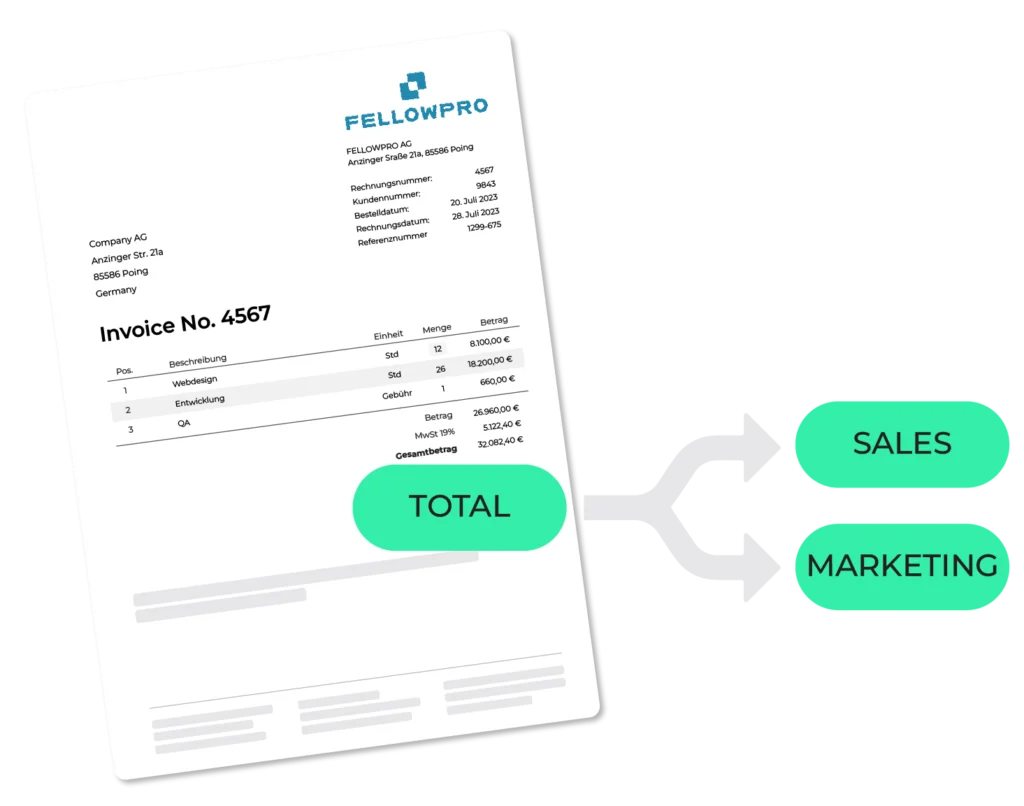
You run a tight finance operation. Your team knows the accounts. They know which supplier goes to which cost center. The problem isn’t knowledge — it’s repetition.
Every invoice that lands in accounts payable needs to be coded. GL account, cost center, maybe a project code or a department dimension. For non-PO invoices, there’s no purchase order to lean on — just experience and memory. And when someone is out sick, or when invoice volumes spike at month-end, things slow down. Errors creep in, postings need to be corrected, the close gets pushed.
It’s not a people problem, it’s a process problem! And it has a fix.
In the context of ERP systems like Infor LN, Infor M3, and SAP, auto accounting means something specific: the automatic assignment of general ledger (GL) codes, cost centers, and account dimensions to incoming invoices — without your team having to touch them.
The system reads the invoice, it recognizes the supplier and knows your account structure. It applies the correct coding — based on your historical posting data, your defined rules, and the content of the invoice itself. Your team reviews exceptions. Everything else flows through automatically.
This is not a workaround, it is a native capability, built directly into how DocBits integrates with your ERP.
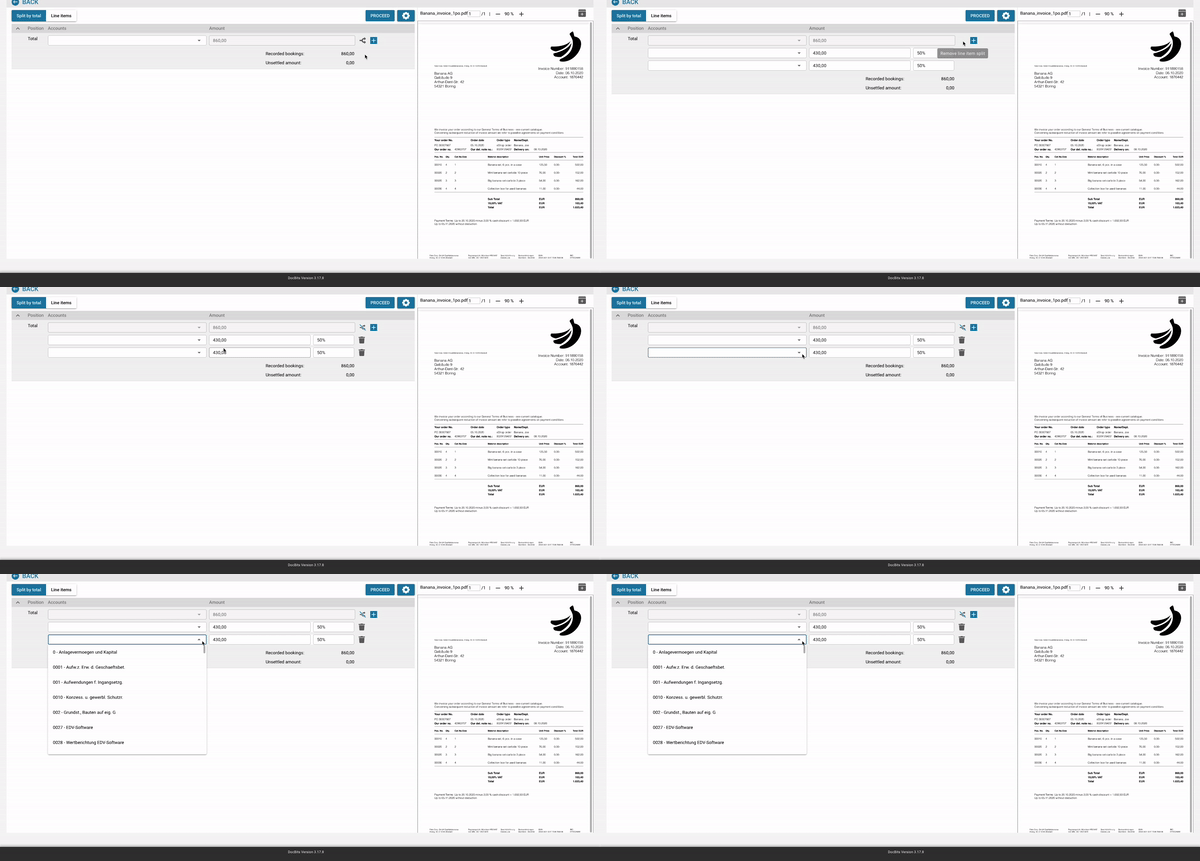
The biggest concern finance teams have about automation: “Will this force us to restructure everything?” The answer is no. Auto Accounting works within your existing ERP setup — your chart of accounts, your cost center structure, your posting rules. Nothing gets replaced. The manual work gets removed.
When an invoice enters DocBits — whether by email, upload, or EDI — the system extracts all relevant data: supplier, line items, amounts, tax codes. It then matches that data against your posting history and applies the correct GL codes and cost centers, line by line. For a supplier your team has invoiced a hundred times before, the coding happens in seconds. No input required.
You define how accounts are assigned — by supplier, by document type, by cost center, or by any dimension in your ERP. The system follows your logic, not the other way around. When something doesn't fit your rules clearly enough, it gets flagged for human review — not silently miscoded. Your team stays in the loop where it matters, and out of the loop where it doesn't.
Once an invoice is coded and approved, it posts directly into Infor or SAP. No export, no copy-paste, no second system to maintain. Your ERP stays the single source of truth — DocBits just removes the manual steps that used to sit in front of it.
A lot of automation tools claim ERP integration. What most mean is: they export a file your ERP can import. That’s not integration — that’s a workaround with extra steps.
DocBits connects natively. It reads your actual account structures, cost center hierarchies, and posting rules directly from your ERP. And it writes back into your ERP the same way — as if the posting came from inside the system.

Auto Accounting by DocBits is built for finance and accounting teams that:
If your team is spending real time every month on repetitive account coding — this is built for you.
GL coding can be fully automated using an intelligent document processing solution that integrates directly with your ERP. The system captures each incoming invoice, extracts the relevant data — supplier, line items, amounts — and automatically maps it to the correct general ledger accounts, cost centers, and dimensions in your ERP, based on your historical posting data and defined rules. Your team only needs to handle exceptions. For Infor and SAP environments, DocBits provides this as a native integration — meaning no manual re-entry and no additional systems to maintain.
Yes. DocBits Auto Accounting is built specifically for Infor LN, Infor M3, Infor CloudSuite, and SAP. It automatically assigns GL accounts, cost centers, and account dimensions to every incoming invoice — using your existing ERP account structures, supplier master data, and configurable rules. Unlike generic AP automation tools that work around your ERP, DocBits connects natively and posts directly into your system.
Yes — and this is exactly what modern accounts payable automation does. AI-based systems like DocBits analyze invoice content, recognize supplier patterns, and apply the correct GL codes and cost center assignments automatically, based on how your team has historically booked similar invoices. The system learns over time: the more invoices it processes, the more accurately it codes new ones. Your team sets the rules and reviews exceptions — the AI handles the repetition.
The most important factor is native ERP integration — not a file export that your ERP imports, but a direct connection that reads your actual chart of accounts, cost center structures, and posting rules. Beyond that, look for: line-item level coding (not just header-level), configurable rules by supplier and document type, a clear exception-handling workflow so nothing gets silently miscoded, and the ability to learn from your historical posting data. For Infor and SAP environments specifically, the solution should work within your existing account determination logic — without requiring you to restructure anything.
OCR and data capture read what’s printed on an invoice — supplier name, amounts, dates, line items. That’s the input layer. Automated GL coding is the next step: taking that extracted data and determining which accounts, cost centers, and dimensions in your ERP the invoice should be posted to. Many tools stop at capture and leave the account assignment to your team. A complete solution like DocBits handles both — from extraction through to ERP posting — removing the entire manual workflow, not just digitizing the document.
Non-PO invoices are actually where automated GL coding delivers the most value. PO-backed invoices already have an account reference point — the purchase order itself. Non-PO invoices have none, which is why they require the most manual effort from your team today. DocBits handles non-PO invoices by drawing on supplier history, document type, and invoice content to determine the correct account assignment — even without a PO to match against. This is the scenario where most AP teams lose the most time, and where automation saves the most.
Yes — and this is by design. DocBits reads your existing chart of accounts, cost center hierarchies, and posting rules directly from your Infor LN, Infor M3, CloudSuite, or SAP environment. You don’t adapt your account structure to fit the tool. DocBits adapts to your structure and automates the coding within it. Your ERP setup stays exactly as it is. What changes is that the manual step between invoice arrival and ERP posting disappears.
DocBits uses a combination of your historical posting data, supplier master information, and your configurable rules to determine the correct account assignment. For suppliers your team has processed before, the system recognizes the pattern and applies the same coding automatically. For new suppliers, it matches against comparable existing ones and suggests the most likely assignment. You define the rules — by supplier, document type, cost center, or any ERP dimension — and the system executes them consistently. Anything that doesn’t match your rules with sufficient confidence is flagged for manual review, not silently posted.
Implementation is designed around your existing process — not a replacement of it. DocBits is configured using your current supplier master data and ERP account structures. No greenfield setup, no parallel systems to maintain. Most finance teams running Infor or SAP are processing invoices automatically within a few weeks of going live. Your team continues working in the ERP they know. DocBits handles the coding layer that used to sit in front of it. Rules can be adjusted at any time without technical support, so your team stays in control as the process evolves.
Finance teams at manufacturing, distribution, and services companies running Infor and SAP have already made the switch. See what it looks like for your invoice volume, your account structure, and your team.

You are currently viewing a placeholder content from Vimeo. To access the actual content, click the button below. Please note that doing so will share data with third-party providers.
More InformationYou are currently viewing a placeholder content from YouTube. To access the actual content, click the button below. Please note that doing so will share data with third-party providers.
More InformationYou need to load content from reCAPTCHA to submit the form. Please note that doing so will share data with third-party providers.
More InformationYou are currently viewing a placeholder content from Vimeo. To access the actual content, click the button below. Please note that doing so will share data with third-party providers.
More InformationYou are currently viewing a placeholder content from YouTube. To access the actual content, click the button below. Please note that doing so will share data with third-party providers.
More InformationYou are currently viewing a placeholder content from Bunny Stream. To access the actual content, click the button below. Please note that doing so will share data with third-party providers.
More InformationYou are currently viewing a placeholder content from Wistia. To access the actual content, click the button below. Please note that doing so will share data with third-party providers.
More InformationYou are currently viewing a placeholder content from Facebook. To access the actual content, click the button below. Please note that doing so will share data with third-party providers.
More InformationYou are currently viewing a placeholder content from Instagram. To access the actual content, click the button below. Please note that doing so will share data with third-party providers.
More InformationYou are currently viewing a placeholder content from X. To access the actual content, click the button below. Please note that doing so will share data with third-party providers.
More Information